

 View this section on the website
 See edit history of this section
 Post feedback on this section

- 1. Introduction
- 2. Daily Healthcheck
- 3. Document Archive
- 4. Change History
- 5. Development Area
- 6. Space Pagetrees
- 7. New Or Updated Page Release Process
- 8. Consistency
- 9. Refined Theme
- 10. New Version
1. Introduction
The maintenance of SWEHB includes daily Health Checks as well as larger additions of features and functionality. Some of these new features must be developed, tested and incorporated into the overall SWEHB. This section covers all of the known forms of maintenance currently used in maintaining SWEHB.
Maintenance at the SWEHB Handbook level also includes maintenance that covers multiple SWEHB versions.
- 2. Daily Healthcheck - a series of checks performed on SWEHB daily to verify its readiness and identify problems.
- 3. Document Archive - a description of how certain documents are stored, and divided to allow reuse in SWEHB pages.
- 4. Change History - a running log of major changes to SWEHB by year.
- 5. Development Area - a description of how the "Development Area" is used in each SWEHB Version
- 6. PageTree - a description of the Hierarchy of a SWEHB Version and how to use drag and drop to reorganize the hierarchy.
- 7. Release Process - a description of how content releases are managed in SWEHB.
- 8. Consistency - a description of how consistency of language and terms is managed in SWEHB.
- 9. Refined Theme - a description of how the Refined Theme product is used to manage Header and Footer information across Versions.
- 10. New Version - a description of how a new version of the SWEHB can be built from an existing version.
2. Daily Healthcheck
- SWEHBVA - Healthcheck
- SWEHBVB - Healthcheck
- SWEHBVC - Healthcheck
- SWEHBVD - Healthcheck
It can be viewed by anyone. Each of the tabs tests a specific part of the software. The content in the tab explains what is being tested and displays what the viewer will see when there is an error, The content also explains what a "good" test looks like. In some cases the viewer must click on a link to exercise the software being tested and ensure proper functioning.
2.1 Tabs And Tests
The following tabs are available in the SWEHBVD version of Healthcheck:
- TABSETUP - tests the "tabsetup" User Macro. This is the macro that displays content like a tabbed set of cards. If you see the tabs, the macro is working properly.
- This page shows where all the "tabsetup" macros are found: tabsetup (1465)
- Panel & Note - This tab displays several styles of panels, warning, and notes used in SWEHB. All come from Confluence Basic Macros.
- This page shows where all the Panel macros are found: panel (1898)
- This page shows where all the Warning macros are found: warning (14)
- This page shows where all the Note macros are found: note (717)
- This page shows where all the Info macros are found: info (199)
- SWEREF Macro - tests the SWERF and SWERFN macros. Clicking on the 123 link should take the viewer to the Resources tab. This tests the functionality of the SWERFN macro.
- This page shows where all the SWEREFN macros are found: swerefn (633)
- Resources - REFSTABLE Macro - This contains a report that comes from the Reporting plugin. It reports on data contained in the References Table which is built using the Scaffolding Plugin. A list of selected references demonstrates the proper working of these plugins.
- Other - Displays the functioning of 3 Applicability Macros.
- TOC - Displays the table of contents macro for the Healthcheck page.
- Show If - shows the working of the Show-If macro. parts of the tab will not be displayed unless the viewer is an editor.
- Gliffy - displays a Gliffy flow chart diagram if the Gliffy plugin is working.
- Expand - This tab displays a working example of the Expand macro. All come from Confluence Expand Macros.
- This page shows where all the expand macros are found: expand (493)
Macro tallies in this section are taken from the Macro Usage section of the Confluence Administration page. Click on a link to open a search query for all instances of pages where the macro is used.
2.2 Daily Healthcheck
Each day, the SWEHB Maintainer is responsible for running Healthcheck and other tests to assess the operation of the whole SWEHB system. The links below are used to check on the system.
- https://swehb.nasa.gov - This goes to the default SWEHB version. Currently this is the SWEHBVD home page - Book A. Introduction.
- https://swehb-staging-pri.msfc.nasa.gov - This goes to the Staging SWEHB version. Normally this is the same as SWEHBVD Production home page - Book A. Introduction.
- https://swehb.nasa.gov/display/SAEHB/Book+A.+Introduction - This goes to the Production SAEHB version for Software Assurance.
- https://swehb.nasa.gov/pages/reorderpages.action?key=SWEHBVD - This is the Pagetree for the Production SWEHBVD
- https://swehb.nasa.gov/display/SWEHBVD/Healthcheck - This is the Healthcheck for version SWEHBVD on Production.
- https://swehb-staging-pri.msfc.nasa.gov/display/SWEHBVD/Healthcheck - This is the Healthcheck for version SWEHBVD on Staging.
- https://swehb.nasa.gov/collector/pages.action?key=SWEHBVD - displays SWEHBVD pages with recent action. Check to see that only valid editors are making changes.
- https://swehb.nasa.gov/collector/pages.action?key=SWEHBVC - displays SWEHBVC pages with recent action. Check to see that only valid editors are making changes.
- https://swehb.nasa.gov/collector/pages.action?key=SWEHBVB - displays SWEHBVB pages with recent action. Check to see that only valid editors are making changes.
- https://swehb.nasa.gov/collector/pages.action?key=SITE - displays SITE pages with recent action. Check to see that only valid editors are making changes.
- https://swehb.nasa.gov/collector/pages.action?key=7150 - displays 7150 pages with recent action. Check to see that only valid editors are making changes.
- https://swehb.nasa.gov/display/SWEHBVD/SPAN+Access - tests the SPAN link. Should take you to SPAN in NEN.
- Make sure SPAN is available
- Open all Center Libraries in new tabs to make sure they are available. See Documentation of SPAN for more information.
- https://swehb-staging-pri.msfc.nasa.gov/collector/pages.action?key=MSH7009B - displays MSH7009B pages with recent action. Check to see that only valid editors are making changes.
- https://swehb-staging-pri.msfc.nasa.gov/collector/pages.action?key=MSHSITE - displays MSHSITE pages with recent action. Check to see that only valid editors are making changes.
If there are any error messages or unexpected results, investigate and fix. Some fixes may require help from IT group.
3. Document Archive
When certain documents are used in the SWEHB, it is convenient to have a copy of the document in the Document Archive. When it is brought into the Archive it is decomposed into pieces that can be used in many places in the SWEHB. Usually, pieces are used in many pages throughout the a SWEHB version. It is easier to maintain document integrity by pulling in a piece with an Include-Page macro than to manually copy and paste it from the parent document.
The process of copying a document into the Archive and disassembling it is described below.
3.1 Selecting a Document to Archive
Only those documents that are static and have many pieces that will be quoted in the SWEHB in many places should be Archived.
- Static means the document is in it's final, released form. It would not be very productive to archive many draft documents and then have to update all the places where the pieces are used throughout a SWEHB Version.
- "many pieces" means there are lots of small items in a document that will be quoted in SWEHB pages. For example, NPR 7150.2 has several paragraphs that are used in other pages of the SWEHB. NASA-STD-8729.8B has many requirements and SA Tasks that are included in pages throughout the SWEHBVD version.
The documents that are currently in the Document Archive include:
- NASA-STD-8719.29 — NASA Technical Standard 8719.29, Approved: 2023-12-11 Basline - NASA Technical Requirements for Human-Rating. Full text of this NPR as taken from NODIS. Assembled from component pieces beneath this page.
- NASA-STD-8739.8A — NASA Technical Standard 8739.8A - Approved 2020-06-10 - SOFTWARE ASSURANCE AND SOFTWARE SAFETY STANDARD. Full text of this NPR as taken from NODIS. Assembled from component pieces beneath this page.
- NASA-STD-8739.8B — NASA Technical Standard 8739.8B - Approved 2004-27-08 - SOFTWARE ASSURANCE AND SOFTWARE SAFETY STANDARD. Full text of this NPR as taken from NODIS. Assembled from component pieces beneath this page.
- NPR 7150.2C — NASA Procedural Requirements NPR 7150.2C - Approved 2019-08-02 - NASA Software Engineering Requirements. Full text of this NPR as taken from NODIS. Assembled from component pieces beneath this page.
- NPR 7150.2D — NASA Procedural Requirements NPR 7150.2D - Approved 2022-03-08 - NASA Software Engineering Requirements. Full text of this NPR as taken from NODIS. Assembled from component pieces beneath this page.
3.2 Disassembly and Reassembly of a Document
To replicate a document accurately, it will take some editing time. The process below should be done to a level that will yield usable document components. Breaking down a document too much will just be a waste of time if the pieces are never used elsewhere.
In this example, the NPR 7150.2D is used.
3.2.1 Top Level Document Container
The top level document container is a child page of Document Archive.
- It may be constructed by opening the Archive page and selecting the "Create Content" icon. This will force the new page to be created in the proper location in the pagetree.
- Use the document ID as a page title - in this case, "NPR 7150.2D" was used
- Add an Excerpt at the top of the page and put in it the full ID of the document, Approved date, Title, and a comment regarding where the text comes from and how it is assembled. See the example below:
- NASA Procedural Requirements NPR 7150.2D - Approved 2022-03-08 - NASA Software Engineering Requirements. Full text of this NPR as taken from NODIS. Assembled from component pieces beneath this page.
- From the source document, copy the full text and paste it into the new container.
- Save your work
- Check to see that:
- the document is located under the Document Archive
- the document is properly named (page title)
- the excerpt for the new document appears on the Document Archive page
- the document contains the copy of content from the original document
3.2.2 Document Cleanup
This is the most time consuming part of adding a document to the archive. The document must be reformatted in Confluence to look like what it did in the source (usually NODIS, PDF or other server format).
In the example below, the cleanup of NPR 7150.2D is discussed.
- At the top of the document page there is a 2 column table with the document name and other data about the document.
- The Subject line is formatted in header 1 style
- Responsible Office is formatted in header 2 style
- Table of Contents is formatted in header 3 style
- Preface and its subheadings are all in paragraph style
- Chapter 1 is formatted in header 4 style
Moving down to the Preface styles like Header 1, 2, and 3 are used as appropriate to replicate the styles used in the original document. Where Notes are used in the original document, the Note macro is used to contain the note. Where there are diagrams and images, these may have been converted to attachments by Confluence. These will be reformatted later.
Continue reformatting to the end of the document.
Save and test the document to see that everything has been reformatted and looks close to the original source document. Fix formatting issues as much as you can at this point.
3.2.3 Create Child Pages For Reusable Selections
It will be necessary to go through the document and identify the pieces that will be used in other pages of the SWEHB. For each of those reusable pieces, they will need to be copied into child pages under the document page in the pagetree. They also need to be named so they are easy to find. Finally, the text in the document is replaced with an "Include Page" macro.
3.2.3.1 Text Selection
The next section in the example that is considered a reusable portion of text is the paragraph "P.2 Applicability b". It is a piece of text that is referred to be other SWEHB pages. It needs to be pulled out into a child page and included in the document.
- a child page under NPR 7150.2D was created and named 2D-P.2 APPLICABILITY b
- The title of the child page is "2D-P.2 APPLICABILITY b" with
- the prefix "2D" indicating the NPR 7150.2D origin,
- the name "P.2 APPLICABILITY b" indicating the source in the document where the content is taken
- the content is the paragraph formatted so that when it is displayed in the NPR 7150.2D document it will look properly formatted (not like it was cut and pasted in).
- replace the text in the document with an Include-Page macro pointing to the child page so that the document is complete.
3.2.3.2 Table Selection
This example shows how a small tabular piece of information is converted into a child page.
- a child page under NPR 7150.2D was created and named 2D-P.2 Fig 1
- The title of the child page is "2D-P.2 Fig 1" with
- the prefix "2D" indicating the NPR 7150.2D origin,
- the name "P.2 Fig 1" indicating the source in the document where the content is taken
- the content is a table format listing software classifications it was built from a Panel macro with text added and formatted to look like the original document.
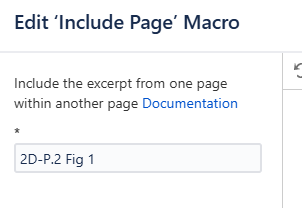
- replace the text in the document with an Include-Page macro pointing to the child page so that the document is complete.
3.2.3.3 Larger Table Selection
This example shows how a large table of information is converted into a child page.
- a child page under NPR 7150.2D was created and named 2D Requirements Mapping Matrix
- The title of the child page is "2D Requirements Mapping Matrix" with
- the prefix "2D" indicating the NPR 7150.2D origin,
- the name "Requirements Mapping Matrix" indicating the source in the document where the content is taken
- the content is a table format listing sections of the document, corresponding SWE numbers, Requirement Text, Technical Authority, ..."
- replace the text in the document with an Include-Page macro pointing to the child page so that the document is complete.
The content replicates the table found in the original document. It uses header styles to display headers appropriately.
3.2.3.4 Diagrams and Images
When a diagram or image is pasted from a source document, Confluence will automatically build an attachment and upload it to the document. If this diagram or image needs to be used as a child page, it will need to be added as an attachment to the child page, pulled into the child page, and then formatted in the child page before it can be used properly.
3.2.4 Test Reassembled Document
Once all of the child pages are built and the text is replaced with the appropriate Include Page,
- The whole document must be compared to the original document to ensure that no parts are missing.
- Check to see that child pages appear in the proper locations.
- Check to see that child pages are properly formatted to look like the originals.
The same Include Page macros that brought child pages into the document will also be used to put those child pages into other SWEHB pages as necessary.
3.3 Using A Piece Of A Document In A SWEHB Page
When you need to display a piece of a archived document in a SWEHB page, Use an "Include-Page" macro.
For example, the NASA software Classification structure is a list of Classes of software taken from paragraph 2, Figure 1 of the NPR 7150.2D document. That table is in the 2D-P.2 Fig 1 child page under NPR 7150.2D in the Document Archive. It is shown in the note box below.
NASA-Wide Software Classifications
Class A Human-Rated Space Software Systems
Class B Non-Human Space-Rated Software Systems or Large-Scale Aeronautics Vehicles
Class C Mission Support Software or Aeronautic Vehicles, or Major Engineering/Research Facility Software
Class D Basic Science/Engineering Design and Research and Technology Software
Class E Design Concept, Research, Technology, and General Purpose Software
Class F General Purpose Computing, Business, and IT Software
Notes: It is not uncommon for a project to contain multiple systems and subsystems having different software classes.
The include page macro that was used to fill the note panel above is shown in the note panel below:
4. Change Plans And History
4.1 Change History
A place for recording certain historical projects as well as the ongoing To Do list. It is contained in the SITE space and is maintained there.
The major content of the Change History includes:
- Completed Work – through 2020
- Work in Progress - 2021
- SWEHBVD Work - 2022
- 2023 Work Completed and ongoing through FY 2023
- 2024 Work Completed and ongoing through FY 2024
- 2025 Work Completed and ongoing through FY 2025
4.2 SWEHBVD To Do List
The active To Do List is embedded in the latest Change History tab. To Do items are in the list and marked as onging.
5. Development Areas
Development areas are designed to contain pages that are being developed for the version and link to active pages in the version. Development pages that were built in SITE may be moved into a version space so that links can be added and tested prior to deployment.
These pages are viewable by any user with a link or by someone using the search function in the space.
6. Space Pagetrees
Each space has a pagetree. This is a hierarchical representation of all the pages in the space. Over time, the pagetrees in spaces have changed based on the content in the space.
6.1 Version Spaces
The original SWEHB was implemented in space 7150. Over time, spaces were added to accommodate more versions of NPR7150.2. At present, 4 versions of the SWEHB are in use:
| NPR Version | Confluence Space | Link to Home Page |
|---|---|---|
| 7150.2A | 7150 | https://swehb-pri.msfc.nasa.gov/pages/reorderpages.action?key=7150 |
| 7150.2B | SWEHBVB | https://swehb-pri.msfc.nasa.gov/pages/reorderpages.action?key=SWEHBVB |
| 7150.2C | SWEHBVC | https://swehb-pri.msfc.nasa.gov/pages/reorderpages.action?key=SWEHBVC |
| 7150.2D | SWEHBVD | https://swehb-pri.msfc.nasa.gov/pages/reorderpages.action?key=SWEHBVD |
Access the pagetrees using the links below:
- 7150 - https://swehb.nasa.gov/pages/reorderpages.action?key=7150
- SWEHBVB - https://swehb.nasa.gov/pages/reorderpages.action?key=SWEHBVB
- SWEHBVC - https://swehb.nasa.gov/pages/reorderpages.action?key=SWEHBVC
- SWEHBVD - https://swehb.nasa.gov/pages/reorderpages.action?key=SWEHBVD
6.2 Target Structure For SWEHB Version Space
| Page Title | Content |
|---|---|
| Book A. Introduction | Top level Page. This is the home page for the space and contains the top level page, "Introduction" for the version. All other main pages are below this page. |
| Activity View | Container for all Activity View pages |
| Admin Pages | This is the container for pages used for space administration and are not top level pages. Children include:
|
| B. Institutional Requirements | Top level page |
| C. Project Software Requirements | Top level page |
| D. Topics | Top level page |
| DEMO AREA | Container page for pages that are ready for reviewers to view and comment on before publishing in the main version content. |
| Human Rated Requirements in SWEHB | Container for all active HR pages |
| Label Database | Labels used in SWEHB for grouping pages |
| Protected Area | This page is the container for all pages that should not be viewed by users. They are for editors only. Children include:
|
| References Table | Page to build master References Table from the References database (currently in 7150 but may be moving to SITE) |
| SWE Pages | Container for all active SWE pages |
| Topics Pages | Container for all active Topics pages including layout pages used in "D. Topics" |
6.3 SITE Space
The content of the SWEHB is contained in the various spaces that have been created over time. Each version of NPR7150.2 has a unique space for it's content.
Some associated functionality is located in the SITE space. https://swehb-pri.msfc.nasa.gov/pages/reorderpages.action?key=SITE
This space contains:
- Activity Tools for SWEHBVD - Pages to display distribution of PATs and Topics in Activities
- Change History for all SWEHB versions by year
- Development Area and Tools - for experimenting with new ideas
- Document Archive - This page is a container for documents which are downloaded into SWEHB and divided into pages for reuse. Details may be found in SWEHBDOC Document Archive.
- Generic Topics - This page is a collection of topics that have been made generic. They don't have links to SWEs or other handbook version specific topics. They reference only the generic name of pages so that users can go into the version of the handbook they are using and open the SWE or Topic there.
- PATs - Process Asset Templates - Database Reports etc - Container for all PAT related pages in SITE - Database, Reports, etc.
- Protected Area - Area for planning and tracking things only for editors - includes SWEHBDOC
- Reference Tools - pages used for maintaining References Table.
- Reports for SWEHB Pages - old reports used for Doc pages with codes (before numbering was fixed)
- SPAN Library - SPAN Library is a collection of pages used for managing SPAN as well as links to SWEHB pages
- SWE History Summary - and history pages for all SWEs
- Term Tools - pages devoted to the Terms Database and manual list - List of Terms, Acronyms, etc.
- Tools Tools - pages devoted to the Tools Database and manual list - List of old Tools
6.4 Managing Pages In PageTree In All Spaces
The pagetree is a very handy place to go to move things around. It is a logical view of all the pages in a space. It does not include Blog pages which are managed elsewhere.
To get to the pagetree for a space, Click on the "Pages" breadcrumb. you will get to a page that has two sections:
- Recently Updated - a list of pages that have been recently updated. Included date of change and editor making the change. The changes can also be viewed from here.
- Tree Browser - this is a version of the pagetree. The more useful version of the pagetree can be opened by clicking on the link "Browse and reorder all pages". This will get you to "Space Tools / Reorder Pages" where you can manage the pagetree,
In the page tree you can open branches and see the next level down for any branch. once you can see the branches and pages you can reorganize them if necessary using a "Drag and Drop" method. This is helpful if you want to move things around.
For example, you might create a new Topic and later discover that it was not in proper branch in the Topics Pages. You might discover this out by looking at the breadcrumbs of the new topic. To fix this,
- Open the pagetree and find
- the branch where the new topic new topic is located and
- the Topics Pages, opening the branch where the new topic belongs
- In the pagetree, drag and drop the new topic to the place in the Topics Pages branch where it belongs.
The page tree can be displayed in one of two ways:
- As you manually organize it - this happens during drag and drops or as branches are created.
- Alphabetically - this can be forced by clicking the icon that looks like capital A with a downward pointing arrow next to it. This will reorganize the pages / branches below the current branch.
7. New Or Updated Pages - Release Process
Because the Handbook maintenance is performed in the Production system, it is necessary to be careful with updates. Content is updated frequently and all updates are immediately available to Handbook users. There are two types of updates, and each goes through a release process designed to catch and resolve errors in content and consistency.
One technique used to minimize these errors is to minimize the number of editors making changes in the Handbook. Another technique is to have the Handbook Maintainer receive "Watch Emails". These emails are sent by Confluence advising watchers of any changes made to pages in a space. The Handbook Maintainer watches all SWEHB version spaces plus the SITE space. Review of these watch emails is a pert of the Release Process.
To keep the content looking clean and consistent, it is necessary to establish consistency standards and then implement those standards as the Handbook is updated and improved. A major way this is implemented is through the use of a Consistency Check as part of the Release Process.
7.1 Minor Changes and Updates
Minor changes include:
- Correction of spelling or grammar errors - These may be caught by the Confluence spellchecker or an AI grammar checker.
- Formatting of subheadings or tabs on a page
- Link errors - Bad link URL
- Attachment errors - either bad links or images that don't display properly
7.1.1 Minor Update Release Process
This is a continuous process used daily by the Handbook Maintainer to minimize errors.
- Review each watch email to identify changes.
- Use the checklist in tab 1 of SWEHBDOC Content Style and Consistency to identify changes that need to be corrected.
- For each change requiring correction, edit the page and make the necessary correction.
- Save and review the page to ensure that all corrections were made properly. Fix any problems found.
- Discard watch emails once they have been reviewed and corrections are verified.
7.2 New Page or Major Update
Release Process - Branch and Merge
Major updates and new pages should be done using the SWEHBDOC Branch and Merge Process. This will keep the new content away from the general population of Handbook users during the development process and give reviewers access to see and make comments before the content is released. The process below may be used during the review period and certainly at the time of the general release of the content to the general area of the Handbook.
- Review each watch email to identify changes.
- Use the checklist in tab 1 of SWEHBDOC Content Style and Consistency to identify changes that need to be corrected.
- For each change requiring correction, edit the page and make the necessary correction.
- Save and review the page to ensure that all corrections were made properly. Fix any problems found.
- Discard watch emails once they have been reviewed and corrections are verified.
- Major updates or new pages should have a blog post prepared and published announcing the release of the update or new page. See SWEHBDOC Blogs In SWEHB for details on building and publishing Blog posts in SWEHB.
Creating New Pages or Updating Pages - Checklist
When preparing either a New Page of just updating an existing page. The "Checklist for New SWEHB Page" should be copied and used to track all the actions necessary for the page. Using this checklist will help ensure that all the steps for the page are completed and nothing is missed.
The "Checklist for SWEHB Page" should be stored under the page that it is used for. Example: be for the new Topic page "8.28 - Preparing and Evaluating Commercial Services Contracts" the checklist would be under it in the hierarchy and named: "Checklist for 8.28". The checklist would be used and updated to track the steps to create the new 8.28 page. Once the page is published and the blog posted, the checklist remains under the parent until a significant update is made to the page. When an update is necessary, a new update checklist is created to replace the new page checklist.
8. Consistency
Content style and consistency gives the Handbook a professional and polished appearance. It is easy to let different styles and phrasing creep into the pages and give the overall Handbook a less than professional appearance. From the viewers perspective, the Handbook should look uniform in its presentation and styling and not have variations in the look and feel appearing on many pages.
This page may be used as a Release Checklist for reviewing Watch list emails and evaluating changes to Handbook Pages.
For full details see SWEHBDOC Content Style and Consistency.
9. Refined Theme
See SWEHBDOC Refined Themes for full details.
10. New Version of SWEHB
As new versions of the NPR are released, new SWEHB versions are built and released. Each new release of the SWEHB is contained in its own space on the Confluence Server. At a high level, as each SWEHB version is built the following maintenance is performed on the new space:
This page is being built as the SWEHBVE space is being constructed. It contains a checklist of things that have been done and things that need to be done to bring the new SWEHB online.
A Development page for the new version is being created in parallel with this new version. The development page is Dev Area For New Version Of SWEHB - SWEHBVE. It will be referenced in the checklist as necessary.
10.1 New Versions of the SWEHBVE and NPR 7150.2E
As the new NPR is created, SWEs and Topics may be added or removed. Updates to pages in SWEHBVD will continue. The copying of most pages to SWEHBVE will be done late in September 2025 to ensure that duplicate work (updating to synchronize SWEHBVD and SWEHBVE) can be minimized.
10.2 Checklist For Construction And Launch Of New SWEHBVE
| Step | Description | Comments |
|---|---|---|
A | Space and Theme Creation (see Dev Area For New Version Of SWEHB - SWEHBVE tab 2) | |
| A1 | New space is created on the Production server
| IT does this - Done 9/3/2025 |
| A1.1 | Key Top Level Pages are copied from SWEHBVD to SWEHBVE
| FDH Done 9/3/2025 |
| A2 | New theme (header and footer materials) is created | IT does this 9/4/2025 |
| A2.1 | Graphics for DRAFT and Production are built into "SWEHB Multiver Graphics.PPT" - Stored in VE-"Book A. Introduction" | FDH Done 9/3/2025 |
| A2.2 | Buttons for Top Level Pages
| FDH Done 9/3/2025 |
| A2.3 | Request to IT to build SWEHBVE Theme and assign it to SWEHBVE space | IT Completed 9/4/2025 |
| A3 | Permissions for SWEHBVE space -
| Done 9/8/2025 |
B | Space Population from SWEHBVD Full copy of SWEHBVD is copied into SWEHBVE and cleaned up | |
| B1 | Book A. Introduction Book A. Introduction - copy was clean -
| FDH 9/4/2025 |
| B2 | Page Sections - most are pointing to VE, or SITE pages
| FDH 9/4/2025 |
| B3 | B. Institutional Requirements - SITE and Page Section links are working | FDH 9/4/2025 |
| B4 | C. Project Software Requirements - SITE and Page Section links are working | FDH 9/4/2025 |
| B5 | D. Topics - SITE and Page Section links are working | FDH 9/4/2025 |
| B6 | E. Tools, References, and Terms SITE and Page Section links are working
| FDH 9/4/2025 |
| B7 | Label database - content working | FDH 9/4/2025 |
| B8 | References Table - content working | FDH 9/4/2025 |
| B9 | Tools Table - content working | FDH 9/4/2025 |
| B10 | Human Rated Requirements in SWEHB - Copied 9/4/2025
| FDH 9/4/2025 |
| B11 | SWE Pages - Need to copy SWEHBVD "SWE Pages" to SWEHBVE
| |
| B12 | Topics Pages -Need to copy SWEHBVD "SWE Pages" to SWEHBVE
| |
| B13 | "SWEHBVD:Activity View" to SWEHBVE under Book A. Introduction
| |
| B14 | Protected Area - Copy from VD to VE after cleanup | |
C | SWEHBVE Cleanup | |
General Cleanup after copies
| ||
| C1 | Book A. Introduction Book A. Introduction - copy was clean - only minor cleanup needed
| |
| C2 | Page Sections - most are pointing to VE, or SITE pages
| |
| C3 | B. Institutional Requirements - SITE and Page Section links are working
| |
| C4 | C. Project Software Requirements - SITE and Page Section links are working
| |
| C5 | D. Topics - SITE and Page Section links are working
| |
| C6 | E. Tools, References, and Terms SITE and Page Section links are working
| FDH 9/4/2025 |
| C7 | Label database - content working | FDH 9/4/2025 |
| C8 | References Table - content working | FDH 9/4/2025 |
| C9 | Tools Table - content working | FDH 9/4/2025 |
| C10 | SWE Pages - Need to copy SWEHBVD "SWE Pages" to SWEHBVE - After "Practice Pages" and its children are deleted from SWEHBVE
| |
| C11 | Topics Pages -Need to copy SWEHBVD "SWE Pages" to SWEHBVE - After "Practice Pages" and its children are deleted from SWEHBVE
| |
| C12 | Human Rated Requirements in SWEHB - Copied 9/4/2025
| |
| B13 | "Activity View"
| |
D | Launch Steps | |
| A final review of content is performed before the new SWEHB is released. | ||
| D1 | Theme Changes: See Dev Area For New Version Of SWEHB - SWEHBVE tab 2)
| IT makes these changes in Themes |
| D2 | Page Top Messages are changed:
| |
| D3 | IT makes the new SWEHBVE the Home page for Confluence. In that way, the URL "SWEHB.NASA.GOV" will take users to the new SWEHBVE Home page. | IT does this in Confluence |
| D4 | Space Permissions changes:
| |
| D4 | Publish Blog Pages
| |
| D5 | Testing of Links in pages:
| |
| D6 | Add SWEHBVE to all versions "Book A. Introduction" page, tab 5.
|
