

 View this section on the website
 See edit history of this section
 Post feedback on this section

- 1. Introduction
- 2. SWEHB Architecture
- 3. SWEHB Style Guide
- 4. SPAN Editor Tips and Tools
- 5. SPAN Maintenance
1. Introduction
SPAN (Software Processes Across NASA) is a Wiki site on NEN in the Software Engineering community.It was originally designed as a Process Asset Library on a Confluence Wiki site. Centers donated documents to be stored in SPAN and the Wiki pages were organized by development phase and documents and templates were made available to NASA users accessing the site.
In 2020, the site was redesigned and relocated to the NASA Engineering Network (NEN). The redesign recognized that having Centers submit individual assets to the SPAN library presented a large maintenance burden for the SPAN maintainers.
1.1 Current Design Of SPAN
The SPAN on NEN is based on Center Process Asset Libraries. It contains links to the Center Libraries that specific Centers have contributed. Additional pages are based on development phase and contain links to pages within the Center PALS for that phase.
Links in SWEHB also point users to specific phase pages in SPAN where users can find documents, templates and training available from the Centers.
The advantage of this design is that less maintenance is necessary for maintainers because Centers rarely make large changes to their PAL organizations. The bulk of changes are to add or remove documents from the existing PAL structure.
By taking users to specific pages in Center PALs, the users are spared the additional trouble of learning how each Center has organized their PAL.
1.1 Additional documentation
The documentation includes details about how the SPAN is built and maintained. Style Guides for certain types of pages are included as pages under this page.
1.2 User Access
Access to SPAN is through NEN / Software Engineering community. Only NASA users who are authorized to use NEN bay access SPAN.
There is a link in SWEHB that will take users to SPAN.
2. Architecture
SPAN is implemented on the NASA Engineering Network. It uses a web management tool that is fairly privative and nothing even close to Confluence in its richness of features.
There are several Communities in NASA that have space on NEN to store and arrange their content. SPAN is implemented in the Wiki section of the "Software Engineering Community. The support person for this community is Daniel Hoffpauir. He can be reached by email through the community on NEN.
SPAN has a navigation button on the home page for the community.
3. SPAN Style Guide
3.1 SPAN Home Page
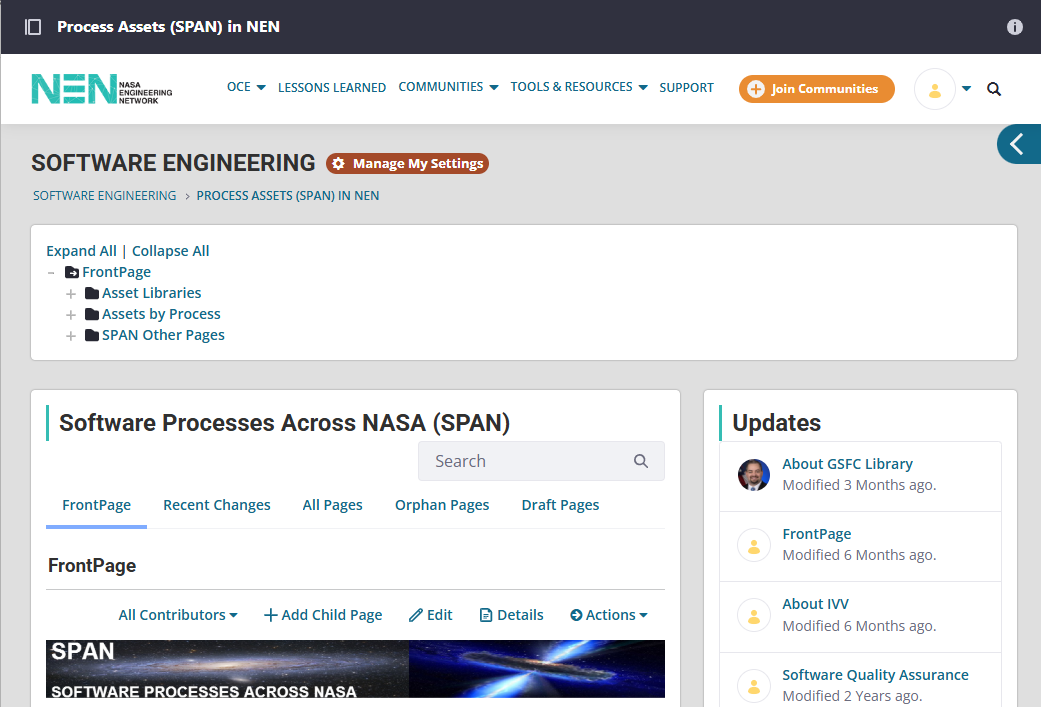 This is the SPAN Home Page on NEN.
It identifies the Software Engineering Community as its home
A small pagetree is provided
The "Frontpage" is the home page for the wiki.
3.2 SPAN Libraries
 Scrolling down the home page will reveal the SPAN libraries.
Each Library is composed of a
- Quick Link to the Library - this takes you to the Center Process Library home page.
- About page for the Library - this page tells you a little about the library at the Center and provides contact information for one or more Civil Servants who maintain that library at the Center.
Some Centers are not participating for a variety of reasons. The 8 that do participate have their libraries.
3.3 Assets by Process
 Each Process Area has a page in SPAN.
The process areas are listed in the home page in this table.
When you click on an "Activity" you will be taken to a page for that process area.
3.4 Process Activity Page
 This is an example of a Process Activity page. It shows the Planning Process page. The page has some short introductory remarks about the activity The typical activity page has the following subheadings:
- Processes and Procedures
- Templates
- Tools
- Other Guidance
- Metrics
- Training
- Lessons Learned
Each of these subheadings has a table with:
- Center
- Title - this is the title of the Center PAL page that the link will take you to
- Description - a short list of some of the assets found on the page
4. SPAN Editor Tools and Tips
To be granted editor permissions, contact Daniel Hoffpauir at NEN. He is the IT contact that can provide permissions and help with the editor for the pages.
4.1 Editing A Page
 When you click on the "Edit" selection on a page you are taken to a small WYSIWYG editor.
There is a tool bar with some of the familar icons that you have in a Word document. Bold, Italic, and Remove Format are available. next are the numbered list and bulleted list icons. Format provides a few header styles.
The link and unlink icons are helpful as is the table generator.
These are all the tools that have been used in SPAN.
4.2 Editing Source Code
 If it is necessary to edit in Source code mode, you can click the "<>Source" icon and get into that mode.
The selection on the left is from the same Planning page as above. It shows the first few lines of the table. As you can see, it is very cryptic but this can be very valuable when making large updates to the table.
To get back to normal view, just click "<>Source" a second time.
4.3 Publish A Page
When you are done editing, be sure to publish your page. That button is at the bottom of the page.
5. SPAN Maintenance
After all the NEN pages were built, the population of the various tables on all those pages was necessary.
5.1 Center PAL
For each Center that contributed their PAL to SPAN, it was necessary to crawl the entire PAL. Notes were taken as to where the various assets were stored and what pages the links to those assets were stored on. This task took some time and was made interesting by how many variations there were in the PALs.
GSFC was the most straight forward PAL. For example, all types of Planning assets, from processes to templates, to Lessons Learned were all on one page. This made finding things very easy.
Other centers grouped things by type. For example, all processes might be listed on one page but templates were on another page.
5.2 Asset Database in Excel
The Asset Database is an Excel Workbook. It contains tabs for all of the SPAN content by Center. Within a center it shows the analysis of Assets by Activity and Type on the left and then in a more cryptic format for the same items on the right.
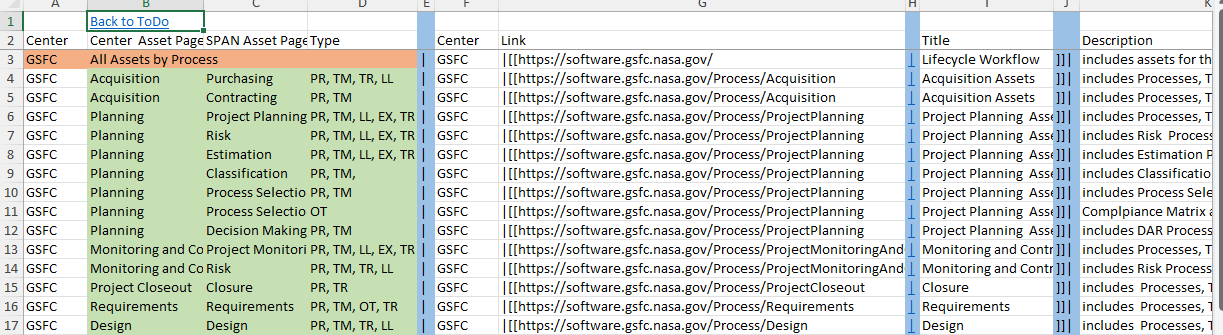
By using Excel it is possible to organize and group rows in the same layout as is used in the NEN pages. The cryptic columns starting with the blue cells, represent the source code formatting used in the NEN pages. By organizing rows of data in Excel and then copy / pasting the appropriate cells from Excel into NEN, the editing of NEN pages is made much easier. It may take a while to get the hang of this method but it pays dividends as you go along.
5.3 Daily Checks And Updates
A part of the daily checks (see SWEHBDOC Maintenance tab 2 - Daily Healthcheck) is to get into the SPAN page on NEN. This demonstrates that NEN is up.
Next, each participating Centers PAL link is opened in a new tab. The link takes you to the home page of the Center PAL. If you can get to it without any error messages, things are good. If you can successfully hit the home page, all of the children of the home page are probably where they belong.
If you hit a Center page and get an error, missing page or entire site cannot be reached, then it is time to look deeper. Contact the designated POC for the PAL (look in the "About ..." page for that Center). They sometimes reorganize a site or even move a site to a different server or Platform (like SharePoint). Regardless of what they have done, it will be necessary to get a good link to the top level page for the PAL. Then you will need to crawl the PAL, updating the Asset Database Spreadsheet as you go along. Once you have the Asset Database updated you can build out the code cells for the NEN pages and update those pages from the spreadsheet. It is not a chore that I loved doing but the spreadsheet made the "impossible task" possible.
