

 View this section on the website
 See edit history of this section
 Post feedback on this section

- 1. Activities and Their SWEHB Components
- 2. Definitions
- 3. Chapter 2 SWE Distribution
- 4. Activity Groupings
- 5. Activity Diagram
- 6. Activities used in SPAN
- 7. Design Decisions
1. Activities and Their SWEHB Components
This is a working page to build the list of activities and the SWEs and topics that define them.
The table below was built from the activity descriptions in NPR 7150.2D chapters 3 thru 5. These are highlighted in yellow. The activity name includes the numbering that came from the NPR. Once we are sure that we know what activities we want to use, we should renumber the activities in a way that seems appropriate. (See Activity Groupings- it contains the activity names that were decided on)
Additional activities were derived from chapter 2. These chapter 2 activities were then copied into the activities highlighted in yellow where they seemed most likely to belong. See the subheading "SWEs from Ch 2 - Institutional Requirements". (See Activity Groupings- it contains the activity names that were decided on)
At this point, all SWEs and Topics are represented "somewhere" in this scheme. It does not mean that they are in all of the appropriate places. Once we decide that the activity names should be, adding and deleting as appropriate, we will need to make sure that all of the SWEs, Topics and other pages are represented in the appropriate Activities.
Distribution Of SWEs Into Activities
- All SWEs in NPR 7150.2D are represented in an activity in the yellow group. SWEs that come from chapter 2 represent things that are done at the Institutional level to enable projects to perform a SWE at the project level. In a sense, they are enabling SWEs. (See Activity Groupings- activities contain all the SWEs )
Distribution Of Topics And PATs Into Activities
- All topics are represented in at least one activity.
- Some topics are associated with multiple SWEs and may appear in more than one activity. For example, topic 8.05 - SW Failure Modes and Effects Analysis deals with design as well as has safety related considerations as well. It appears in both the 3.7 Safety-Critical Software and 4.3 Software Design activities.
- All PATs are represented in at least one activity. Some PATs may appear in multiple activities depending on the same criteria as topics.
Topics That Don't Fit Into Activities
- There are a few topics that don't fit into the activity scheme. They are listed in the next to last row in the red highlight.
Activities That Are Not Represented In This Model
- There are a few topics that are not represented in this activity model. They are listed in the last row in the green highlight. If we want this activity model to match more closely with the way projects do their work, it may be necessary to add these activities into the model and move the appropriate SWEs, Topics, PATs, etc. into them.
Additional Considerations Moving Forward
- 3.8 Automatic Generation of Software Source Code content might be better to put into the activity 4.3 Software Design or 4.4 Software Implementation
- 3.12 Software Bi-Directional Traceability has only one SWE and no other topics or other materials associated with it. It may be more appropriate to put this SWE under 4.1 Software Requirements
- 4.2 Software Architecture and 4.3 Software Design might be better to consider as a single activity.
COLUMNS 1 AND 2 BELOW ARE SUPERCEEDED BY TAB 4 - "ACTIVITY GROUPINGS" DEFINITION
COLUMN 3 WILL BE DISTRIBUTED INTO SWES AS APPROPRIATE TO ENSURE THAT CROSS LINKING IS COMPLETE
2. Definitions
In the context of this view of the SWEHB, some definitions are in order. These are ideas for helping partition the information so it can be organized in a way to make finding things easier.
2.1 Activity
General name for a set of processes, performed by one or more groups of stakeholders in the development life cycle of a software product. Activity names may align with project phases in some cases depending on the development process or life cycle chosen for the project. Some activities are performed in a sequence. Others may be started and continue while others start up later and run in parallel with other activities. An example of this is coding and testing. These activities may appear to run together while different portions or releases of the code are being developed.
An activity is composed of:
- SWEs - requirements that are satisfied during the conducting of the activity, and
- Supplementary Materials - Other work described in the other SWEHB components such as Topics, Checklists, PATs, Document Contents, etc.
2.2 "SWE" Components
Each SWE requirement is composed of one or more objectives that represent an industry best practice that OCE expects projects (on the agency in the case of Institutional Requirements) to perform. How these objectives are achieved is at the discretion of the group satisfying the requirement. Each SWE page lists some tasks that would accomplish the requirement, and guidance on how they might be completed.
Tasks for the Software Engineering (tab 3? - to be defined) as well as Software Assurance (tab 7) are listed. In cases where additional support or more in depth guidance is available, the reader is referred to a Topic.
2.3 "Supplementary Materials" Other SWEHB Components
Any page in the SWEHB that contains guidance on performing a process, such as
- creating a document,
- implementing a development tool,
- preparing for or conducting a review, or
- other related topic supporting the work of an activity.
The SWEHB Topics page could be expanded to organize and present more groupings of topics. Numbering of topics allows existing reference management macros to be used in the Resources tab of the topic.
2.4 Topics and Topic Numbers
In the first SWEHB (space: 7150) there was only a topic group of 7.xx. The topics were all oriented for Software Engineering. Anything that was not a SWE page was a Topic page and numbered appropriately.
Significance of the Topic Number Format
The significance of the numbering was to provide a "hook" for the References Table. Any reference that needed to appear on a Topic page was tagged in the References Table with the 7.xx number for the page. A macro parsed out these characters from the page name and used that as the lookup key for finding references.
There are 3 macros used for building the references list on pages. Each has specific code for finding and using the "key" for finding references.
- refstable - Uses the first 7 characters of the page title to derive the search key for references: SWE-xxx
- refstable-topic - Uses the first 4 characters of the page title to derive the search key for references: x.xx
- refstable-into - Uses a hardcoded key of "Intro"
As we built the next version, SWEHBVB, there were still only Software Engineering topics in the 7.xx group. The Topic 7.18 was built to account for a number of SWEs related to minimum document content being retired. While the SWE was retired, the document and its minimum content was retained. All 19 pages now had to be assigned search keys for references and the code for building the reference lists had to be hard coded.
When SWEHBVC was built, the Topics page was expanded to contain several more groups of topics:
- 7.xx - Engineering Topics
- 8.xx - Assurance and Safety Topics
- Software Design Principles - brought over from the Goddard list of Golden Principles. The list was never properly numbered and all of the references on all the pages had to be manually hardcoded.
- 9.xx Programming Checklists
Additionally, topic 8.16 was built. Some of the document contents from 7.18 were migrated over to 8.16. All of these document pages had search keys and hardcoded reference table code. Adding to the complexity of the problem, these pages were expanded to contain more than just the minimum document content. For example:
- Software Assurance Plan page contained minimum content for the SAP and then expanded to contain minimum content for the Safety Plan content.
- IV&V Project Execution Plan page contains minimum content for the IPEP and some guidance for the RBA and PBRA.
- Software Requirements Analysis page contains content description for the Software Requirements Report as well as detailed guidance on " SW Requirements Analysis Techniques" and "Safety Analysis During Requirements"
Topic 8.16 is growing and branching out to contain a collection of different elements: Minimum Contents of Documents, Analysis Techniques.
We need to look at how Topics (or Supplementary Materials) are being built and ensure that they stay focused while still allowing flexibility in how they are designed and built.
In the table below, I have organized it in Topic Series number order. Rows in green highlight are currently in use. There are several added number series to account for specific types of topics. We may not implement all of these but a few may be necessary in the short run.
Components might include:
| Component Type | Topic Series | Component Description |
|---|---|---|
| Process | 1.xx | Regularly performed set of actions with an expected set of outcomes. An example might be a generic Peer Review Process. A process usually contains:
|
| Cybersecurity Topics | 2.xx | In depth guidance on Software Cybersecurity topics. |
| Software Safety Topics | 3.xx | In depth guidance on Software Safety topics. |
| Review | 4.xx | List of things to do or consider when performing a development or assurance task in a project. Usually includes Items for:
This would initially be populated by taking apart topic 7.09 - Entrance and Exit Criteria with each tab (review) becoming a numbered page. This would allow individual pages to be included in a SWEHB Activity without pulling in the whole of 7.9. We could keep 7.9 and pull in all of the new pages if needed to keep topic 7.9 in its place. This would allow for the documenting other types of Reviews beyond just those in 7.9. |
| Document Content | 5.xx | Describes the minimum content expected in a particular document. This would get us back to the concept of "minimum content of a document" like in the original SWEHB version (space 7150). Each document would be represented by an individually number page in this series. Individual pages could be also be included in other topics as necessary. This is a numbering sequence that needs to be implemented so that hardcoding of references tables can be eliminated. |
| Checklist | 6.xx | List of things to consider when performing some development or assurance task in a project. Checklists are frequently also built into a Process Asset Template (PAT). The PAT is included in the Checklist page so there is only one place to update the Checklist. |
| Software Engineering Topics | 7.xx | In depth guidance on Software Engineering topics. |
| Software Assurance Topics | 8.xx | In depth guidance on Software Assurance topics. |
| Software Design Principles | 9.xx | Software Design Principles. This is a numbering sequence that needs to be implemented so that hardcoding of references tables can be eliminated. 5/9/2023 - Implementation in SWEHBVD complete ?? - Implementation in SWEHBVC? |
| PAT (Process Asset Template) | PAT-xxx | List of things to do or consider when performing a development or assurance task in a project. PATs are formatted into documents that can be downloaded by projects and used or tailored for use in a project. These may be used and included in any of the other Topic series. This series number format will allow using the "refstable" macro to select references if we allow references to be assigned to a PAT. |
| Activities | A.xx | SWEHB Activity View series. This series number format will allow using the "refstable-topic" macro to select references if we allow references to be assigned to an Activity. |
| Other Series | The use of a 4 character key for pages is what would allow for building unique search keys for finding references and building the reference list for pages. once we run out of numbers for the first character, we can move on to alpha characters. Using A for Activities is the first use of this technique. For more series, we could move on to "B.xx", "C.xx", ..., "Z.xx". |
2. Topic Renumber Tracking
| Topic Series | Action | Progress |
|---|---|---|
| 7.1 - 7.9 to 7.01 - 7.09 | Cleanup in SWEHBVD | Done 5/19/2023 |
| Cleanup in SWEHBVC | Working 5/19 | |
| Cleanup in SWEHBVB | ||
| Cleanup in 7150 | ||
| 8.1 - 8.9 to 8.01 - 8.09 | Cleanup in SWEHBVD | |
| Cleanup in SWEHBVC | ||
| Design Principles 9.01 - 9.17 | Cleanup in SWEHBVD | Done 5/19/2023 |
| Cleanup in SWEHBVC | Done 5/19/2023 | |
| Activities A.01 - A.13 | Implemented in SWEHBVD | Done 5/19/2023 |
| Checklists 6.01 - 6.09 | Cleanup in SWEHBVD | |
| Cleanup in SWEHBVD | ||
3. Distribution of Chapter 2 SWEs - Complete - See Tab 4
The SWEs from NPR 7150.2D chapter 2 are the Institutional Requirements. Initially, I grouped them into 7 "activities" to make sure that they didn't fall out of the overall activity scheme. The table below is the result of that work.
SWEs that come from chapter 2 represent things that are done at the Institutional level to enable projects to perform a SWE at the project level. In a sense, they are enabling SWEs.
Additional activities were derived from chapter 2 and are highlighted blue below as the first 7 activities. These chapter 2 activities were then copied into the activities in tab 1, highlighted in yellow, where they seemed most likely to belong.
| Activity Name | Institutional SWEs |
|---|---|
A.07 Software Release, Operations, Maintenance, and Retirement | |
"Benchmarking and Appraisals" SWE-209 - Benchmarking Software Assurance "Process Library" SWE-144 - Software Engineering Process Assets Process Definition Related SWE-002 - Software Engineering Initiative SWE-208 - Advancing Software Assurance and Software Safety Practices SWE-003 - Center Improvement Plans SWE-095 - Report Engineering Discipline Status SWE-006 - Center Software Inventory "Measurements and Metrics" SWE-091 - Establish and Maintain Measurement Repository SWE-092 - Using Measurement Data SWE-142 - Software Cost Repositories Matrix and Classification Related SWE-223 - Tailoring IV&V project selections SWE-140 - Comply with Requirements SWE-150 - Review Changes To Tailored Requirements Training Related |
4. Activity Groupings
This tab contains the new table of Activities based on our agreement with Tim's input.
- SWEHB Activity will be the name of the activity we use going forward.
- NPR Activity Groupings reflects the names of the groups of SWEs found in the NPR.
- Rows have been added for each SWE so that Supplementary Materials can be associated with the appropriate SWEs.
- The content of the Supplementary Materials column for each SWE if taken from the SWEs Related SM child page.
- The SWEs Related SM child page is built from:
- Related links to Supplementary Materials in the SWE Guidance (tabs 3 and 7)
- Research from tab 1 of "Activities and Composition" page where all Topics, checklists, PATs, etc. were distributed to the SWEs that seemed to be relevant.
- The SWE will be updated to call out all of the relevant materials.
- The SWEs Related SM child page is built from:
- The example in SWE-013 comes from a current idea in development regarding how links are listed.
4.1 Activity Pages - Built from the Group's list
See A.00 Activity View in SWEHBVD for the list of activities
4.2 Activities based on Tim's Email
See A.00 Activity View in SWEHBVD for the list of activities
5. Activity Diagram - See Diagram in "A.00 Activity View page
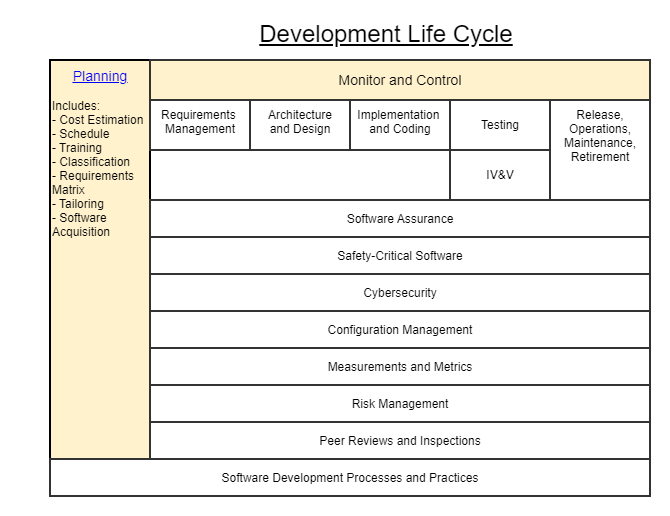
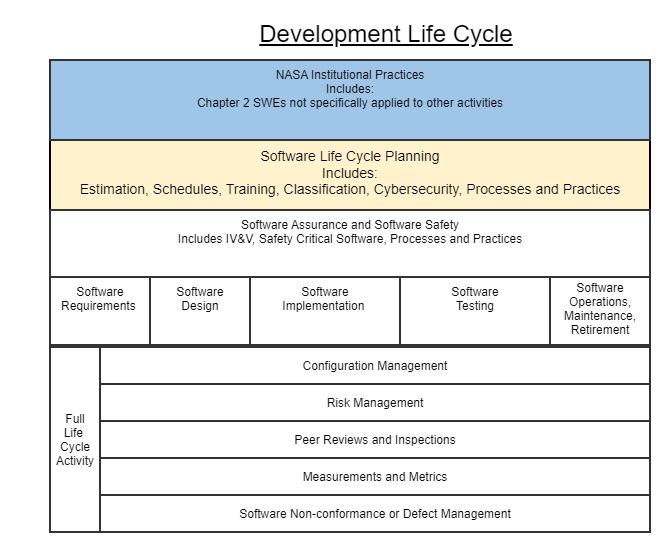
This activity Diagram represents the SWEHB Activities and their layout on a timeline. The timeline is notional and only represents the predecessors and successors and not any iterations that might be necessary in the real world.
5.1 Diagram in A.00 Activity View
Diagram with live links is in the page A.00 Activity View tab 1.
5.2 - Fred's Initial Rough Cut Of Activity Groupings In A Diagram
Gliffy diagrams plugin has been fixed. One of the greatest benefits of Gliffy diagrams is the ability to embed a link in the diagram. I will use this diagram to experiment with Gliffy capabilities. Eventually, a diagram similar to this one will be used to give users a visual representation of the Activity View of SWEHB.
5.3 Tim's Activities in a Diagram
6. Activities used in SPAN
One element that should probably be in each activity is a link to the SPAN page where more information about the Activity from the Center perspective can be seen.
6.1 Bi-directional Traceability - Between SWEHB and SPAN
- Each Activity in SWEHB will have a subsection containing a link to the appropriate page in SPAN containing links to Center pages with assets.
This is a list from SPAN of Activities used in various Center Process Asset Libraries. Each of the SPAN Activity pages contains a link to the SPAN Library page where Links to Center libraries are listed that are relevant to the activity. Each Center maintains their libraries. Each Center library contains only those assets which the Center has decided to share outside of the Center.
The description of the page, includes a brief statement of the contents, the requirement group from NPR 7150.2 which is applicable, and the applicable SWEHB Activity.
This page link must be updated whenever the link to the SPAN page changes. This is part of SPAN Maintenance.
SPAN Library Link Pages
- SPAN Center Libraries — top page of SPAN listing all Centers' libraries Used in many Topics and some Activities
- SPAN Classification — Classification of Software. Used in 3.5 Software Classification Assessments, A.01 Software Life Cycle Planning
- SPAN Code and Integration — Coding and software integration assets. Used in 4.4 Software Implementation, 3.8 Automatic Generation of Software Source Code, A.05 Software Implementation
- SPAN Configuration Management — Configuration management and change control assets. Used in 5.1 Software Configuration Management (SCM), A.08 Software Configuration Management (SCM), A.12 Software Non-conformance or Defect Management
- SPAN Contracting — Assets used when contracting software development. Used in 3.1 Software Life Cycle Planning, A.01 Software Life Cycle Planning
- SPAN Decision Making — Safety assets. Used in A.01 Software Life Cycle Planning
- SPAN Design — Assets for use during product design. Used in 4.3 Software Design, 3.10 Software Reuse, 4.2 Software Architecture, A.04 Software Design
- SPAN Estimation — Estimation processes and related assets. Used in 3.2 Software Cost Estimation, A.01 Software Life Cycle Planning,
- SPAN Improvement — Process Improvement activities including SEPG. Used in 3.9 Software Development Processes and Practices, A.01 Software Life Cycle Planning, A.13 NASA Institutional Requirements
- SPAN Metrics — Metrics assets. Used in 5.4 Software Measurements, A.11 Software Measurements
- SPAN Peer Review — Review processes and follow up activities. Used in 5.3 Software Peer Reviews and Inspections, A.10 Software Peer Reviews and Inspections
- SPAN Process Selection — Selecting processes using the Compliance Matrix. Used in 3.5 Software Classification Assessments, A.01 Software Life Cycle Planning
- SPAN Project Monitoring and Control — Monitoring and control assets. Used in 3.1 Software Life Cycle Planning, A.01 Software Life Cycle Planning
- SPAN Project Planning — Project planning and scheduling assets. Used in 3.1 Software Life Cycle Planning, 3.3 Software Schedules, A.01 Software Life Cycle Planning
- SPAN Purchasing — Assets used in purchasing software. Used in 3.1 Software Life Cycle Planning, A.01 Software Life Cycle Planning
- SPAN Release, Sustain and Retire — Assets used during product release, Sustaining activities, and Retirement. Used in 4.6 Software Operations,
- SPAN Requirements — Assets for recording and tracking requirements and change control. Used in 4.1 Software Requirements, 3.12 Software Bi-Directional Traceability, A.03 Software Requirements
- SPAN Risk Management — Risk Management assets. Used in 5.2 Software Risk Management, A.09 Software Risk Management
- SPAN Safety — Safety assets. Used in 3.7 Safety-Critical Software, A.02 Software Assurance and Software Safety
- SPAN Software Quality Assurance — Software Quality Assurance and Audit assets. Used in 3.6 Software Assurance and Software Independent Verification & Validation, A.02 Software Assurance and Software Safety
- SPAN Training — General Training. Used in 3.4 Software Training, A.01 Software Life Cycle Planning
- SPAN Verification and Validation — Testing, Verification and Validation assets. Used in 3.6 Software Assurance and Software Independent Verification & Validation, 4.5 Software Testing, A.06 Software Testing, A.02 Software Assurance and Software Safety
6.2 Activity Groupings in NPR 7150.2 but not explicitly in SPAN
| Activity Grouping in NPR | How it is accounted for in SPAN |
|---|---|
| 3.11 Software Cybersecurity | Not currently accounted for in SPAN |
7. Design Decisions
Edit: 7. Design Decisions
| # | Design Element | Question | Design Requirement |
|---|---|---|---|
| 1 | Activity Names | What is the list of Activity Names that will be used in the Activity View of SWEHB? Decision: Use Tim's Naming of Activities |
|
| 2 | Diagram | Should we have a high level diagram on the top level activity page? Decision: Open - will continue to develop Tim's diagram with activity links, etc. Example is in A.00 Activity View tab 1. |
|
| 3 | Related Link Tables | Updates in all SWEs (tab 3 and 7). Topics are in work. Decision: Preference is to have a single column in tabs 3 and 7 with just links (no other excerpts or requirements). No table in Tab 5 Resources. Decision: No "implied" links in Related Links tables. Make only one list with links for both tabs 3 and 7. | See examples in SWE-013 Software Plans - Related Links demo
|
| 4 | Subheading for SPAN | Many pages mention SPAN as a place to go for Center PAL assets. Decision: Move these references to a subheading and add a link to the page in SPAN containing the assets in question. | See examples in SWE-013 Software Plans - Related Links demo
|
| 5 | Cross-linking SWEs, Activities, and other materials | Many pages contain links to "Related" pages. Decision: How should cross linking be done across page types? | In SWEs, we are implementing the "Related Links" tables in the Additional Guidance subheadings. These links will point to SWEs, Supplementary Materials and Activities as appropriate.
|
| 6 | Activity page Layout | What information should be displayed on an Activity page? |
|
| 7 | SWE Pages | Is every SWE accounted for in one or more Activities? Question: who wants to come up with the rationale statements? |
|
| 8 | Topic and other pages | Is every Topic and other appropriate SWEHB page accounted for in one or more Activities? Question: who wants to come up with the rationale statements? |
|
| 9 | What to do with SWE tab 4s | Do Small Project tabs belong in SWEs or should Small Projects be the subject of a Topic? | This would free up a tab for other use. |
| 10 | What to do with SWE tab 2s | Most Rationale statements are small, could they be put on tab 1? | This would free up a tab for other use |
