

 View this section on the website
 See edit history of this section
 Post feedback on this section

- 1. The Requirement
- 2. Rationale
- 3. Guidance
- 4. Small Projects
- 5. Resources
- 6. Lessons Learned
- 7. Software Assurance
- 8. Objective Evidence
1. Requirements
5.1.7 The project manager shall perform software configuration audits to determine the correct version of the software configuration items and verify that they conform to the records that define them.
1.1 Notes
NPR 7150.2, NASA Software Engineering Requirements, does not include any notes for this requirement.
1.2 History
1.3 Applicability Across Classes
Class A B C D E F Applicable?


Key: - Applicable | - Not Applicable
1.4 Related Activities
This requirement is related to the following Activities:
| Related Links |
|---|
2. Rationale
Configuration audits provide checks to ensure that the planned product is the developed product.
Software configuration audits are critical for ensuring the integrity, traceability, and quality of software configuration items throughout the lifecycle of a software project. The rationale behind this requirement is to provide confidence that software configuration items (CIs) are accurate, complete, and compliant with the project’s technical and process requirements. Configuration audits also help verify that the artifacts being managed (including code, documentation, test cases, and other components) align with the project’s approved records.
Key Rationale Elements:
1. Ensuring Configuration Integrity
Software configuration audits ensure that there is no mismatch between the recorded information about a software configuration item (e.g., version numbers, change history) and the actual item itself.
- Why: Mismatches or discrepancies may lead to incorrect baselines, incompatible components, or issues during integration, testing, and delivery.
- Example: If a software component is updated but its status or version information is not updated in the project’s records, it could cause component misalignment during a build or deployment.
2. Supporting Traceability of Changes
Audits confirm that all changes to a configuration item are properly documented, approved, and traceable through the project’s configuration management system.
- Why: This ensures that any changes—whether implemented to fix a defect, meet new requirements, or make enhancements—are controlled and do not introduce unnecessary risks.
- Example: Traceability helps prevent unauthorized or accidental changes that could result in failures, especially in mission-critical or safety-critical NASA projects.
3. Verifying Compliance with Baselines
Audits verify that the configuration items match their defined baselines (e.g., requirements baseline, design baseline, build baseline, release baseline).
- Why: Baselines are critical snapshots of the project’s progress at specific points in time. Configuration audits ensure that the CIs conform to the correct baseline for a specific project phase and eliminate any ambiguity.
- Example: Before beginning hardware-software integration, a configuration audit ensures that the software build being tested conforms to the approved baseline and supports functional compatibility with the hardware baseline.
4. Preventing Inconsistencies During Delivery or Operations
Successful delivery of the correct version of the software is central to project success. Audits verify that the software configuration matches the documentation, build data, and other project artifacts before delivery or operational use.
- Why: Using an incorrect or incomplete configuration during delivery could result in delays, failures, or unsafe operations.
- Example: A mission’s flight software must be verified to conform to the operational baseline before delivery to prevent incompatible or incomplete software from reaching the spacecraft.
5. Reducing Project Risks
By identifying discrepancies, missing artifacts, or unauthorized changes early, configuration audits help reduce risks to the project’s schedule, cost, and technical performance.
- Why: Issues identified during integration, testing, or operations can be costly to fix. Configuration audits prevent escalation of undetected errors by addressing discrepancies at earlier phases.
- Example: Without an audit, a missing or incorrect test case for a specific software feature could leave critical defects undetected until deployment.
6. Supporting Process Improvement and Compliance
Audits are an opportunity to verify that configuration management processes are being followed as defined in the Software Configuration Management Plan (SCMP) and other project documentation.
- Why: This ensures accountability, adherence to NASA standards, and readiness for external reviews or certifications.
- Example: Audit results can identify areas where configuration management practices require improvement, enabling corrective actions that improve process efficiency across the project lifecycle.
Types of Configuration Audits and Their Contributions
Functional Configuration Audit (FCA):
- Ensures the software or system meets its specified requirements (e.g., functionality and performance).
- Validates that the correct version of software was developed and meets documented requirements.
Physical Configuration Audit (PCA):
- Confirms that the delivered software product matches what is defined in design documents (e.g., the version described in the version description document matches the actual software delivered).
- Verifies that all technical documentation is complete and reflects the correct state.
Example Scenarios in NASA Projects
Scenario 1: Software Build Before Integration
During the development of a flight control system, a configuration audit is conducted to verify the software build before it is integrated with hardware. The audit ensures:
- The software being tested matches the design described in the baseline.
- All changes since the previous baseline are documented and approved.
- The version is traceable to its requirements and test cases.
Scenario 2: Pre-Flight Readiness Check
Before a spacecraft launch, a complete configuration audit confirms that:
- The correct version of flight software was loaded onto the spacecraft.
- The configuration of the ground support software matches the mission's operational needs.
- Any changes to software assets since the last release are fully documented and verified.
Key Benefits of Configuration Audits
- Accuracy: Verifies the correctness of versions, ensuring software integrity.
- Traceability: Provides end-to-end traceability for requirements, design, implementation, and testing.
- Consistency: Ensures delivered software matches documented baselines and artifacts.
- Compliance: Confirms adherence to established standards, procedures, and project plans.
- Accountability: Ensures all changes are documented, approved, and traceable, preventing rogue or unauthorized modifications.
- Risk Mitigation: Identifies and resolves discrepancies early, reducing the risk of failures during integration, system testing, or operations.
Conclusion
The rationale for this requirement is grounded in the need to ensure the integrity, accuracy, and consistency of software artifacts within NASA’s complex and often safety-critical projects. By performing configuration audits, the project manager ensures these practices are enforced, critical risks are mitigated, and that software systems meet both technical and mission objectives. Configuration audits are not only essential for validating project deliverables but also serve as a cornerstone for maintaining control over the dynamic and evolving nature of software development. This rigor is especially vital in NASA’s high-stakes environments where a single software failure can jeopardize an entire mission.
3. Guidance
3.1 Configuration Audits
Software configuration audits play a critical role in ensuring the integrity and quality of software configuration items (CIs). They verify that all configuration items, baselines, and associated records conform to project requirements, documentation, and standards. These audits ensure the correct version and revision of CIs are included in baselines or releases, achieving their intended performance and functional characteristics as specified by system engineering and mission requirements. Furthermore, audits contribute to traceability, enable compliance assurance, and support project-wide accountability.
Audits specifically validate:
- The completeness, correctness, and compliance of CIs with documented requirements.
- That all associated operational and support documents are accurate, complete, and meet their stated requirements.
- That all CIs intended to be part of a baseline or release are correct, approved, and included in the final delivery.
Types of Audits
Configuration audits are divided into Functional Configuration Audits (FCAs) and Physical Configuration Audits (PCAs). Both audits are important for ensuring software quality and should be adjusted to meet the rigor required for the phase of the project and the criticality of the software.
- Audits for major milestones, such as formal releases, should be comprehensive, formal, and rigorous.
- Audits for interim or internal releases may be less formal, as defined by project needs.
Functional Configuration Audit (FCA)
The FCA ensures that the software or system meets its functional and performance requirements as defined in the functional baseline documentation, typically approved at the Preliminary Design Review (PDR) and Critical Design Review (CDR).
Key Objectives of FCA:
- Validate that the software functionality meets all requirements through formal test documents, test results, and verification/validation (V&V) reports.
- Confirm that all approved changes have been correctly implemented and documented.
- Ensure updates to project documentation, including operational and support documents, reflect the current state.
- Compare the implemented code against documented requirements to confirm traceability.
- Confirm that all testing specified in the project plan has been executed successfully.
- Perform additional sample testing or rerunning of tests, as needed.
Importance:
FCA directly links test results and configuration items to functional requirements, ensuring that delivered products support mission objectives and safety standards.
Checklist: A checklist template for FCA can be found in PAT-037 - Configuration Management Process Audit.
Physical Configuration Audit (PCA)
The PCA ensures that the physical (or coded) implementation of the software matches the product baseline specified in the approved design documentation and configuration release plans.
Key Objectives of PCA:
- Validate completeness of the system specifications and eliminate all "TBD" (To-Be-Determined) placeholders.
- Ensure that discrepancies and actions identified during the FCA are documented and resolved.
- Verify consistency between the architectural design and the detailed design components.
- Review module-level implementation for compliance with coding standards, design requirements, and overall guidelines.
- Confirm the completeness, format, and accuracy of user manuals and other documentation to ensure alignment with the system’s functionality and objectives.
Additional audit topics to consider:
- Software reflects the approved design and architecture.
- Documentation (user guides, developer manuals, etc.) complies with standards.
- Activities, validations, and tests have been conducted according to project plans, contracts, or requirements.
Checklist: A checklist template for PCA can be found in PAT-037 - Configuration Management Process Audit.
3.2 Planning for Audits
Audit planning is a critical activity that ensures audits are performed systematically, efficiently, and effectively. The Software Configuration Management Plan (SCMP) (see SWE-079) outlines the audit process, including goals, schedules, participants, contractor involvement, and procedures.
When planning for audits:
- Focus on sampling records rather than performing exhaustive reviews of every configuration item. Sampling should represent a broad cross-section of the project's scope and critical software functionality.
- Ensure audit independence by designating auditors who have no direct responsibility for the software products or processes being reviewed.
Basic Steps in an Audit:
- Planning: Establish the scope, goals, and procedures for configuration audits. Define roles, responsibilities, and deliverables for all participants.
- Preparation: Collect audit materials, such as requirements documents, technical specifications, test results, V&V reports, and baseline records. Ensure auditors are briefed on the scope of the audit.
- Performance: Conduct the audit by reviewing records, testing documents, comparing CIs to baselines, and performing sample testing as needed. Identify discrepancies, issues, and findings.
- Close-Out: Generate an audit report summarizing findings, including major and minor non-conformances, corrective actions identified, and follow-up steps. Ensure corrective actions are documented, implemented, and evaluated for effectiveness.
Reference: The Department of Defense Configuration Management Guidance Handbook provides tailored tables for planning, preparation, performance, and close-out activities, including both Government and contractor roles.
3.3 Data Typically Reviewed
NASA’s Systems Engineering Handbook (NASA/SP-2007-6105) outlines the typical data reviewed during configuration audits. Examples include:
- Functional requirements specifications.
- Technical design documents (architectural and detailed).
- Coding standards and compliance reports.
- Test plans, formal test results, and V&V documentation.
- Change requests, change logs, and problem reports.
- Approved operational, support, and user documentation.
- Baseline and build reports detailing included versions and revisions.
3.4 When Should Audits Be Done?
Audits should be conducted at key points during the project lifecycle to prevent errors, ensure compliance early, and minimize costly fixes or rework later. Consider the following timing options:
- At Product Release: Ensure that the product is complete, includes the correct versions and revisions, and meets the defined objectives.
- Before Delivery: Verify the completeness and compliance of deliverables with documented baselines, resolving discrepancies, open work, deviations, waivers, and other issues.
- End of Lifecycle Phase: Follow Capability Maturity Model Integration (CMMI) or similar best practices to identify and prevent systemic issues.
- Before Baseline Updates: Ensure any new baselines (e.g., updated test baseline or operational baseline) are formally reviewed and approved.
- Incrementally for Large Systems: For complex systems, conduct smaller audits focused on functional areas, with a summary audit conducted at key milestones.
3.5 Reporting Audit Results
Reporting the results of configuration audits requires clarity, objectivity, and completeness. When documenting audit findings:
- Include positive observations: Highlight areas of success or compliance to demonstrate overall project health.
- Separate major and minor findings: Group findings based on the severity and impact of the non-conformances. Major findings are those that could significantly impact performance, schedule, cost, or safety; minor findings are isolated issues with limited impact.
- Document corrective actions: Ensure non-conformances include specific corrective actions to address root causes and prevent recurrence.
- Follow up: Conduct post-audit reviews to confirm that corrective actions were implemented successfully and are effective.
3.6 Key Takeaways
Software configuration audits play a pivotal role in ensuring the quality, integrity, and compliance of software products throughout the lifecycle. By planning audits effectively, executing FCA and PCA with rigor, and addressing findings promptly, teams can prevent costly errors, ensure accountability, and deliver high-quality software configurations that satisfy mission objectives. Tailoring audits based on project size, complexity, and criticality ensures efficiency without compromising thoroughness or quality.
The basic steps in an audit are:

A Checklist template for PCA can be found in PAT-037 - Configuration Management Process Audit.
NASA/SP-2007-6105, NASA Systems Engineering Handbook, 273 includes the following table showing the data typically reviewed during each of these audits:

See also SWE-079 - Develop CM Plan, SWE-083 - Status Accounting.
See also SWE-085 - Release Management,
3.7 Additional Guidance
Additional guidance related to this requirement may be found in the following materials in this Handbook:
| Related Links |
|---|
3.8 Center Process Asset Libraries
SPAN - Software Processes Across NASA
SPAN contains links to Center managed Process Asset Libraries. Consult these Process Asset Libraries (PALs) for Center-specific guidance including processes, forms, checklists, training, and templates related to Software Development. See SPAN in the Software Engineering Community of NEN. Available to NASA only. https://nen.nasa.gov/web/software/wiki 197
See the following link(s) in SPAN for process assets from contributing Centers (NASA Only).
| SPAN Links |
|---|
4. Small Projects
For small projects, it is critical to tailor configuration audit processes to balance thoroughness with efficiency, considering limited resources and less complex project scopes. Configuration audits can be simplified without compromising their essential purpose: verifying that configuration items (CIs) and baselines meet requirements, are correctly documented, and conform to applicable standards.
Below is tailored guidance for small projects that can help streamline efforts while ensuring compliance with SWE-083.
Small Project Guidance
1. Types of Configuration Audits: Simplified Approach
Small projects should conduct both Functional Configuration Audits (FCA) and Physical Configuration Audits (PCA) to ensure completeness and correctness. One audit event can potentially combine these two types if complexity is minimal and the CIs are tightly linked.
Functional Configuration Audit (FCA) for Small Projects
The FCA focuses on ensuring the software product meets functional requirements. For small projects:
- Limit the scope to high-level functional areas that are critical to the project.
- Use a checklist that includes verification of test results, requirements traceability, and validation reports to confirm functionality has been met.
- If formal documentation is unavailable or limited (e.g., full validation reports), sample testing can be conducted to verify functionality in real-time during the audit.
Physical Configuration Audit (PCA) for Small Projects
The PCA ensures that the physical implementation matches approved design documentation and builds/releases represent the correct baseline. For small projects:
- Focus on core documentation such as module lists, coding standards compliance, and user manuals.
- Use lightweight methods (e.g., code walkthroughs, design inspections) to confirm the software complies with the architecture and baseline.
Small projects might consolidate FCA and PCA into a single review session if practical.
2. Tailored Audit Planning
Audit planning for small projects should simplify processes while maintaining essential steps outlined in the Software Configuration Management Plan (SCMP).
Key Considerations for Small Project Audit Planning:
- Audit Scope: Limit audits to key functional components and deliverables critical to mission success. Avoid exhaustive reviews of less impactful components.
- Resources: In small teams, auditors might also act as developers or test engineers; however, ensure the auditor's role remains independent to avoid conflicts of interest (e.g., designate someone uninvolved in developing the audited artifact).
- Frequency: Perform audits only at critical milestones:
- Before delivery or release to ensure completeness and readiness.
- After significant changes (e.g., major bug fixes or feature additions).
- At the end of each lifecycle phase (e.g., design, coding, testing).
Tips for Audit Planning in Small Projects:
- Use pre-established checklists (e.g., an FCA or PCA template like PAT-037) to streamline audit steps.
- Collaborate with developers, testers, and stakeholders to focus on areas of greatest risk.
- Consolidate FCA and PCA steps into a single audit event for efficiency.
3. Lightweight Audit Procedures
Small projects can reduce overhead by following a simplified audit procedure.
Steps to Conduct a Configuration Audit:
Prepare Audit Scope:
- Identify a subset of records and configuration items to sample (e.g., testing results, builds, and documentation critical to success). Avoid exhaustive record reviews.
- Define success criteria for the audit (e.g., all CIs in the release match the baseline).
Review Critical Items:
Focus on:- Functional requirements and their corresponding test results.
- Release artifacts, including design documentation and version description documents.
- Change requests and defect fixes linked to the release baseline.
Perform the Audit:
- Verify compliance with coding standards, requirements, and baselines.
- Confirm traceability between requirements, designs, code, and tests.
- Sample test cases to validate functionality if formal test documentation is minimal.
Document Results:
- Use concise audit reports that summarize major findings and corrective actions in a format appropriate for the scale of the project.
- Report both positive observations and areas requiring corrective action.
Close Out the Audit:
- Record actions required to resolve non-conformances.
- Follow up to confirm corrective actions have been implemented.
4. Simplify FCA and PCA Checklists
For small projects, reduce checklist complexity while still confirming key aspects of audits:
Functional Configuration Audit (FCA) Checklist (Tailored for Small Projects):
- Review test results, focusing on critical functionality.
- Confirm requirements traceability from documentation to implementation.
- Sample verification and validation results (or conduct real-time test execution).
- Ensure approved changes were incorporated into the release baseline.
Physical Configuration Audit (PCA) Checklist (Tailored for Small Projects):
- Confirm software build matches the approved baseline and includes the correct versions of all CIs.
- Review coding standards adherence and architecture/design compliance.
- Verify user documentation (e.g., any manuals or guides) matches the system’s functional and operational description.
Small projects should document findings with minimal overhead. A concise checklist can often serve as both audit evidence and reporting documentation.
5. Use Lightweight Tools
Leverage simple tools and techniques to conduct configuration audits without overburdening the team:
- Use version control systems (e.g., Git logs or commit history) as evidence for PCA compliance.
- Employ spreadsheets or lightweight tools (e.g., Google Sheets or Excel) for tracking audit results, sampled artifacts, and corrective action items.
- Conduct audit meetings virtually or with minimal face-to-face interaction to reduce logistical overhead.
6. Timing for Audits
For small projects, choosing the right timing is critical to stay efficient:
- Pre-Delivery Audits: Perform an audit before any software is delivered or released to ensure all documentation, configurations, and required testing is complete.
- End-of-Phase Audits: Conduct audits at the end of key project lifecycle phases (design, coding, testing) to catch issues before transitioning to the next phase.
- Incremental Audits: Split large functionalities (if applicable) into smaller portions and conduct incremental audits as portions are completed.
Avoid performing audits too frequently, as this can overwhelm small teams. Focus only at critical milestones or delivery points.
7. Reporting Audit Results
For small projects, audit reporting should focus on concise summaries of findings:
- Findings: Clearly describe discrepancies or non-conformances discovered, include severity (major/minor), and explain their impact (e.g., defects affecting functionality versus documentation issues).
- Positive Observations: Report compliance areas to show progress and performance quality.
- Corrective Actions: Outline required actions to resolve discrepancies, assigning responsibility and timelines for completion.
- Follow-Up Items: Plan limited follow-ups to ensure non-conformances are resolved without undue project delays.
Format: Use simple templates (e.g., a one-page checklist annotated with audit notes) to minimize overhead while still providing formal documentation.
Key Takeaways for Small Projects
- Focus configuration audits on critical components, baselines, and functional areas central to success.
- Use simplified checklists and lightweight tools to streamline audit preparation, execution, and documentation.
- Plan audits at key milestones or transitions to minimize impact on team resources and ensure timely identification of issues.
- Keep audit reporting concise and actionable to avoid introducing unnecessary complexity.
- Consolidate FCA and PCA into a single event when feasible, tailored to the scope and scale of the project.
By adopting these streamlined practices, small projects can meet the requirements of SWE-083 without overburdening team resources or compromising audit quality.
5. Resources
5.1 References
- (SWEREF-001) Software Development Process Description Document, EI32-OI-001, Revision R, Flight and Ground Software Division, Marshall Space Flight Center (MSFC), 2010. See Chapter 13. This NASA-specific information and resource is available in Software Processes Across NASA (SPAN), accessible to NASA users from the SPAN tab in this Handbook.
- (SWEREF-022) Functional Configuration Audit Form, Form 0010 NASA Marshall Space Flight Center (MSFC), 2010. This NASA-specific information and resource is available in Software Processes Across NASA (SPAN), accessible to NASA users from the SPAN tab in this Handbook.
- (SWEREF-044) Physical Configuration Audit Form, Form 0011, NASA Marshall Space Flight Center (MSFC), 2010. This NASA-specific information and resource is available in Software Processes Across NASA (SPAN), accessible to NASA-users from the SPAN tab in this Handbook.
- (SWEREF-197) Software Processes Across NASA (SPAN) web site in NEN SPAN is a compendium of Processes, Procedures, Job Aids, Examples and other recommended best practices.
- (SWEREF-212) IEEE Computer Society, IEEE STD 1042-1987, 1987. This link requires an account on the NASA START (AGCY NTSS) system (https://standards.nasa.gov ). Once logged in, users can access Standards Organizations, IEEE and then search to get to authorized copies of IEEE standards.
- (SWEREF-216) IEEE STD IEEE 828-2012, 2012., NASA users can access IEEE standards via the NASA Technical Standards System located at https://standards.nasa.gov/. Once logged in, search to get to authorized copies of IEEE standards.
- (SWEREF-224) ISO/IEC 12207, IEEE Std 12207-2008, 2008. IEEE Computer Society, See Key section: Stakeholder Requirements Definition Process. NASA users can access IEEE standards via the NASA Technical Standards System located at https://standards.nasa.gov/. Once logged in, search to get to authorized copies of IEEE standards.
- (SWEREF-273) NASA SP-2016-6105 Rev2,
- (SWEREF-278) NASA-STD-8739.8B, NASA TECHNICAL STANDARD, Approved 2022-09-08 Superseding "NASA-STD-8739.8A"
- (SWEREF-343) This NASA-specific information and resource is available in at the System for Administration, Training, and Educational Resources for NASA (SATERN), accessible to NASA-users at https://saterninfo.nasa.gov/.
- (SWEREF-351) U.S. Department of Defense (1997). Editor Note: Revision A is the reference. This URL is the download page for this document. The download is free.
- (SWEREF-513) Public Lessons Learned Entry: 641.
5.2 Tools
5.3 Process Asset Templates
(PAT-037 - )
Topic 8.12, Checklist for Auditing the SWE Requirements related to the Software Configuration Management Process. This PAT replaces PAT-001 - FCA and PAT-002 - PCA.
6. Lessons Learned
6.1 NASA Lessons Learned
Configuration audits provide a critical mechanism to ensure software configuration management processes identify and resolve discrepancies in software development and integration projects. Historical NASA missions have demonstrated that failures to perform comprehensive configuration audits can lead to catastrophic consequences, while their proper implementation serves as a key risk mitigation strategy.
Key Lessons Learned From the NASA Lessons Learned Database
1. Mars Climate Orbiter (MCO) Mishap Investigation Board – Phase I Report (Lesson Number 0641)
The Mars Climate Orbiter mission failure is a prime example of the consequences of insufficient configuration audit processes. The failure stemmed from a serious disconnect between project teams at the Jet Propulsion Laboratory (JPL) and the contractor, where software specifications were misinterpreted, leading to the use of incompatible units of measurement (Metric vs. English). Configuration audits were explicitly highlighted as a potential mitigation step to prevent such miscommunications.
Key Takeaways from Mars Climate Orbiter:
- Configuration audits should validate that all data exchanges between interfacing systems (or teams) comply with agreed-upon software and data specifications.
- Regular software configuration audits, particularly during critical milestones, could have uncovered the data incompatibility earlier in development or testing phases, likely preventing the failure.
- Audit recommendations include the need to ensure specification compliance on all interfaces—especially critical data formats and units—for both internal teams and external contractors.
Lesson Applied:
- Integration points (e.g., interfaces between systems, teams, or contractors) must be a focus area for configuration audits to prevent catastrophic mission failures.
2. Mars Polar Lander / Deep Space 2 Failure Review Board Report
Another example of the importance of configuration audits arose during the investigation of the Mars Polar Lander and Deep Space 2 mission failures. The root cause analysis revealed significant deficiencies in configuration management, including incomplete testing, inadequately maintained baselines, and undocumented changes.
Key Takeaways from Mars Polar Lander:
- Configuration audits should confirm that the intended baseline matches the built and tested software to avoid errors sneaking into later phases undetected.
- Audits should verify that changes to baselined software are correctly documented, reviewed, and traceable. Uncontrolled or undocumented changes to software can introduce defects or gaps in verification.
Lesson Applied:
- Employ physical configuration audits (PCA) to ensure that the released software aligns with the correct design and test documentation, with all changes properly reviewed and reflected in the baseline.
3. NOAA/NASA/DOD N-Prime Satellite Mishap
The N-Prime satellite mishap highlights the consequences of inadequate or incomplete configuration controls. While the incident itself involved hardware handling, the overarching need for configuration management rigor applies equally to software configuration.
Key Takeaways from N-Prime Satellite Mishap:
- Configuration audits are critical not just for technical checks, but also to validate compliance with organizational processes and operational readiness.
- Verification of compliance with defined build and delivery processes as part of the PCA could reduce risks associated with rushed or non-compliant configurations.
Lesson Applied:
- Use configuration audits to ensure that all key processes (e.g., reviews, approvals) for software build, test readiness, and release are complete and compliant with organizational standards.
4. Lessons from Smaller Missions and Incremental Releases
Configuration challenges are not limited to large, complex missions. Across NASA's smaller missions and incremental software releases, inadequate or delayed audits have resulted in the delivery or testing of incomplete, incorrect, or misaligned software products.
Key Takeaways:
- On smaller projects or incremental releases: Even lightweight audits should validate key aspects such as code integrity (correct version in the build), test result reviews, and interface compliance.
- Failure to perform audits incrementally increases the risk of compounding errors, which can escalate costs or risks in the later phases of development or testing.
Lesson Applied:
- For smaller missions, configuration audits should be appropriately tailored but not skipped—planning early for critical checkpoints ensures issues do not propagate through the lifecycle.
Expanded General Lessons Learned from NASA Projects
Specification Validation is Critical:
Configuration audits must prioritize checking compliance with baseline specifications, including data exchange, interfaces, and operational requirements. This validation ensures that changes or gaps in understanding do not propagate as defects.Timely Audits Catch Systemic Issues Early:
Configuration audits performed at the end of every lifecycle phase (e.g., requirement baseline, design baseline, integration baseline, and operations) reduce the risk of undetected systemic issues. Delaying audits increases the cost of addressing discrepancies.Continuous and Incremental Audits to Address Mission Complexity:
For complex or large-scale projects, focusing each audit on a subset of critical functionalities and components ensures more manageable progress. This avoids overwhelming teams and enables early identification of risks and issues.Contractor and Internal Team Coordination:
Interfaces between multiple teams (e.g., NASA and contractors) are high-risk collaboration points. Configuration audits should validate that specifications, standards, and tools are aligned across all stakeholders to avoid integration failures.Baseline Completeness is Non-Negotiable:
Audits should identify and eliminate "TBD" or incomplete placeholders in system specifications, software requirements, and architecture before approval of the baseline. Approving an incomplete baseline can cascade into critical downstream errors.Integration Points Require Extra Scrutiny:
Configuration audits of software interfaces between components or with hardware need additional rigor. Seamless integration is often where defects occur due to mismatched assumptions between teams.Documentation Completeness is a Must:
Audits must ensure that all operational, user, and support documentation aligns with the built and tested system. Inadequate documentation can create risks during deployment, operations, and maintenance.
Key Recommendations Based on Lessons Learned
- Focus Areas for Audits: Ensure configuration audits emphasize:
- Verification of interface consistency and compatibility.
- Testing results and requirements validation for mission-critical components.
- Ensuring the completeness and traceability of change requests and problem reports.
- Mandatory Specification Compliance Audits: As highlighted in the Mars Climate Orbiter mishap, all data exchanges and interfaces must be verified for compliance with design specifications before integration and testing phases.
- Contractor Collaboration Audits: Coordinate configuration audits for contractors to verify compliance with agreed-upon processes, baselines, and interface data.
- Timely Incremental Audits: Perform configuration audits at defined checkpoints within the project's lifecycle to avoid last-minute discoveries that could derail schedules.
5. Late and Incomplete Flight Software (FSW) Delivery
Incident:
The Psyche mission experienced an eight‑month late delivery of the final GNC flight software build, with hundreds of control parameters and fault protection behaviors still undefined. This delay, combined with numerous unresolved software issues, contributed directly to the missed 2022 launch opportunity.
Lesson Learned:
- Early Software Definition & Maturity: Mission‑critical software requirements, parameters, and behaviors must be fully defined and matured early to prevent cascading delays.
- Rigorous Defect Disposition: “Use‑as‑is” and unverified failure dispositions must undergo strict technical review to prevent acceptance of excessive residual risk.
Implication:
Delays and ambiguity in software maturity directly threaten launch schedules, increasing cost, workforce strain, and mission‑risk exposure.
Conclusion: Why Configuration Audits Matter
The lessons learned from NASA's mission histories repeatedly validate the importance of configuration audits in preventing failures caused by discrepancies, undocumented changes, and misaligned baselines. Audits not only ensure that software meets functional and physical requirements but also validate process integrity, identify risks early, and ensure compliance with the rigorous standards required for NASA's high-stakes missions. By incorporating these lessons into practice, future missions can mitigate risks, align team efforts, and ensure the delivery of robust, mission-ready software.
6.2 Other Lessons Learned
No other Lessons Learned have currently been identified for this requirement.
7. Software Assurance
7.1 Tasking for Software Assurance
1. Confirm that the project manager performed software configuration audits to determine the correct version of the software configuration items and verify that the results of the audit conform to the records that define them.
7.2 Software Assurance Products
Software assurance (SA) ensures the integrity, reliability, and compliance of software products and processes by participating in configuration audits and verifying adherence to the project’s configuration management plan. The following artifacts are generated, reviewed, or used by Software Assurance to fulfill responsibilities under this requirement:
Software Problem Reporting or Defect Tracking Data:
SA examines problem and defect tracking systems (e.g., Jira, Bugzilla, GitHub Issues) to verify that all identified issues are being properly tracked, resolved, and linked to appropriate configuration items (CIs). This data helps confirm compliance with baseline documentation and ensures that change requests have been properly evaluated and implemented.Software Configuration Management System Data:
SA reviews outputs from the software configuration management system (e.g., Git, Subversion, ClearCase) to verify the integrity of baselines, traceability between changes and artifacts, and the correct version/revision of all CIs in the release.Software Assurance Audit Results on Change Management Processes:
SA conducts or reviews audits to assess how effectively the project manages change requests (CRs), problem reports (PRs), and updates to configuration baselines. These audits validate adherence to the change management processes defined in the Software Configuration Management Plan (SCMP) and ensure that all changes to software work products are properly reviewed, approved, and documented.Software Version Description Documents (VDDs):
Verification of the VDD ensures that all artifacts within a given release—including software, documentation, and test data—are complete, consistent with the baselines, and satisfy delivery requirements. SA reviews the VDD alongside audit results to confirm compliance and completeness of the release documentation.Audit Reports for Functional and Physical Configuration Audits (FCA/PCA):
SA generates or participates in audit reports during FCA and PCA stages. These reports include findings, non-conformances, and resolutions, documenting whether the product baseline and delivery items meet the project’s technical and process requirements.Sign-Off Evidence for Delivery:
SA verifies and signs off on delivery documentation. This sign-off serves as evidence that all software products, baselines, and associated artifacts meet their requirements and are approved for release.
7.3 Metrics
To measure and evaluate compliance with SWE-083, several metrics can be tracked by SA. These metrics provide insight into the effectiveness of configuration management practices, including the depth and rigor of audits conducted. Below are key metrics for monitoring:
Configuration Audit Metrics:
- Number of Configuration Management Audits conducted by the project (Planned vs. Actual).
- Number of Compliance Audits planned (e.g., FCA/PCA) vs. the number of Compliance Audits performed.
Non-Conformance Metrics:
- Number of Software Work Product Non-Conformances identified during each project lifecycle phase (e.g., design, testing, release) over time.
- Number of Non-Conformances found in release documentation (e.g., open vs. closed).
- Total number of Process Non-Conformances (e.g., omitted or incomplete activities) identified by SA, and the percentage accepted and resolved by the project team.
Trend Metrics (By Phase or Over Time):
- Trends in the number of Open vs. Closed Non-Conformances over time.
- Number of Non-Conformances detected per audit (e.g., FCA, PCA, process maturity audits).
- Trends in the Number of Non-Conformances across multiple audits over time, filtered by type (e.g., process compliance, standards violations, work product defects).
Closure Metrics:
- Time to resolve Open Items identified during FCA/PCA audits.
- Percentage of corrected actions from audit findings that resolve root causes.
See also: Topic 8.18 - SA Suggested Metrics for additional guidance.
7.4 Guidance
The role of Software Assurance in SWE-083 involves direct participation in the project's Functional Configuration Audit (FCA) and Physical Configuration Audit (PCA) to verify configuration compliance, traceability, and system integrity. SA personnel are responsible for auditing the processes, tools, artifacts, and outcomes to ensure that configuration activities meet both the project’s requirements and NASA standards.
7.4.1 Functional Configuration Audit (FCA) Responsibilities
The Functional Configuration Audit (FCA) ensures that the software or system meets its functional and performance requirements as defined in the Functional Baseline (approved at the Preliminary Design Review [PDR] and Critical Design Review [CDR]).
SA Responsibilities During FCA:
- Confirm that the software product meets its approved requirements via verification and validation (V&V) artifacts.
- Audit formal test documentation and associated test data for completeness and consistency.
- Review results of all approved changes to ensure traceability from request to implementation.
- Validate that the software functionality traces back to requirements without gaps, omissions, or errors.
- Assess whether all required testing—both planned and additional testing—has been successfully performed.
Checklist: Use the FCA checklist template provided in PAT-037 - Configuration Management Process Audit.
7.4.2 Physical Configuration Audit (PCA) Responsibilities
The PCA verifies that the software implementation matches the Product Baseline (established at delivery or release). It confirms that all "as-built" software products are consistent with the corresponding design documentation and are included in the release baseline as specified in the Version Description Document (VDD).
SA Responsibilities During PCA:
- Audit the VDD to ensure it lists all items in the release baseline, including correct versions, patches, or updates.
- Compare the "as-built" software product to design documentation and code listings to ensure compliance with configuration records.
- Confirm that modules or components adhere to coding and other technical standards.
- Review all operational and user documentation (e.g., user manuals) for completeness and alignment with configuration documentation.
- Audit for discrepancies between the intended and actual product baselines, ensuring all deviations, waivers, and open work items are accounted for and resolved.
Checklist: Use the PCA checklist provided in PAT-037 - Configuration Management Process Audit.
7.4.3 Post-Audit Activities and Sign-Off
After completing FCA and PCA, Software Assurance is responsible for:
Reporting Audit Findings:
- Classify findings as major (critical defects) or minor (small discrepancies or omissions).
- Document corrective actions needed to address findings.
Approval Sign-Off:
- Verify that all audit action items have been resolved or deferred with proper approval.
- Sign off on the delivery documentation to formally indicate that the software product is complete, compliant, and ready for release.
Follow-Up:
- Ensure that corrective actions are implemented effectively and verified during subsequent reviews or audits.
Key Takeaways for Software Assurance
- Participate in and contribute to both FCA and PCA to validate functional and physical compliance.
- Use outputs from configuration management systems, audit findings, and release documents to assess the integrity of the configuration management process.
- Track and report metrics to measure audit completeness, non-conformances, and resolution trends over time, enabling continuous process improvement.
- Leverage checklists and templates for consistency in audit execution and reporting.
- Ensure all required configuration-related activities, baselines, and artifacts are complete and verified prior to delivery and sign-off.
By actively focusing on configuration audits, Software Assurance ensures the quality, reliability, and integrity of NASA's software products at every stage of the lifecycle.
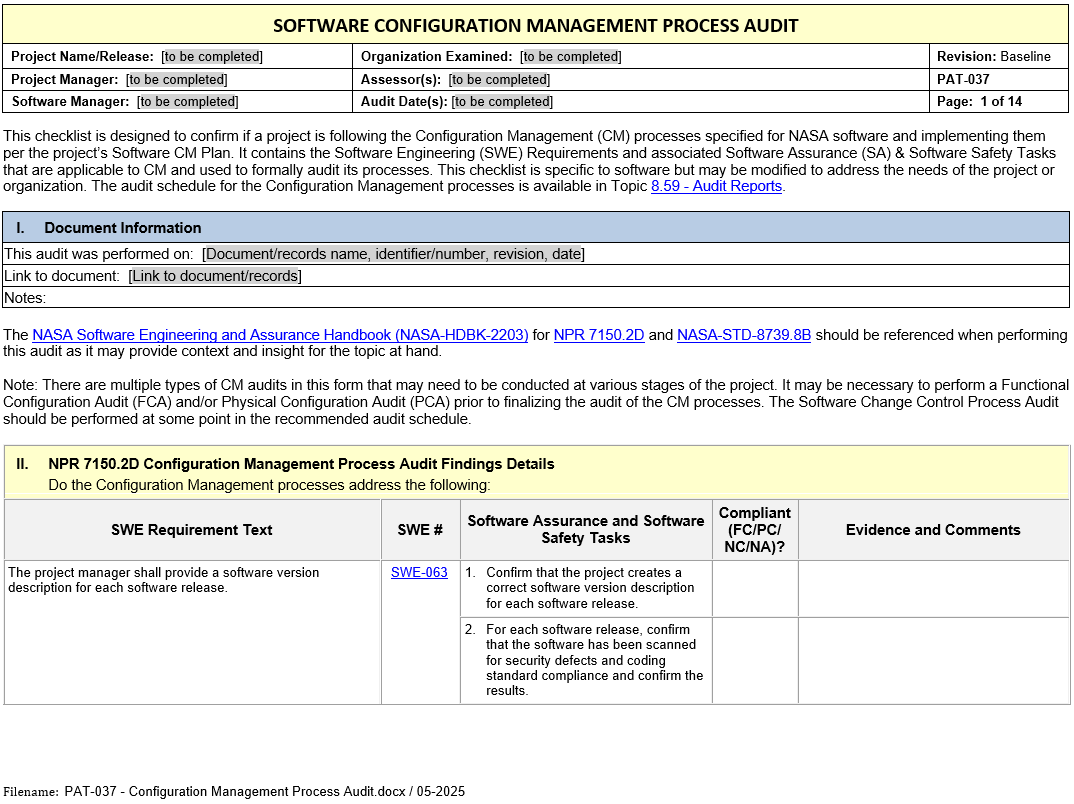
Checklists for performing a Functional Configuration Audit and a Physical Configuration Audit are included in PAT-037 - Configuration Management Process Audit. To get a downloadable copy of the checklists, click on the small document box.
CM Process Audit Checklist PAT-037
Click on the image to preview the file. From the preview, click on Download to obtain a usable copy.
7.5 Additional Guidance
Additional guidance related to this requirement may be found in the following materials in this Handbook:
8. Objective Evidence
Objective Evidence
Objective evidence refers to verifiable artifacts, records, or data that demonstrate compliance with a requirement. For SWE-083, which mandates that the project manager perform software configuration audits to ensure the integrity and correctness of software configuration items (CIs) against documented baselines, objective evidence must demonstrate that configuration audits were properly planned, performed, and resolved.
Below is a list of objective evidence that can support compliance with this requirement:
1. Configuration Management Plan (SCMP)
- A documented Software Configuration Management Plan (SCMP) that outlines:
- The process for planning, conducting, and documenting configuration audits (FCA and PCA).
- Specific roles and responsibilities for conducting audits.
- Scope, frequency, and criteria for audits.
- Guidelines for addressing discrepancies and implementing corrective actions.
Purpose: Demonstrates that configuration audits are part of the project’s formal software configuration management process.
2. Configuration Audit Reports
Functional Configuration Audit (FCA) Report:
- Documents the results of the FCA, verifying that the software meets all functional and performance requirements as defined in the functional baseline documentation.
- Includes:
- Summary of test results and V&V activities.
- Review of mappings between requirements, test cases, and test results.
- Assessment of resolved and unresolved non-conformances.
Physical Configuration Audit (PCA) Report:
- Documents the results of the PCA, verifying that the "as-built" software product matches the technical and design documentation in the product baseline.
- Includes:
- Comparison results between the product and its baseline documentation.
- Evidence of version and revision control compliance.
- Evaluation of supporting materials, such as user manuals and release notes.
Purpose: Serves as primary evidence of completed and documented audit processes.
3. Audit Checklists
- Completed checklists tailored for FCA and PCA (e.g., PAT-037 - Configuration Management Process Audit templates) that provide a systematic review of:
- Functional compliance (FCA).
- Physical compliance with baselines, documentation, and tools (PCA).
Purpose: Demonstrates that audits were conducted systematically and key review areas were addressed.
4. Version Description Documents (VDDs)
- VDDs for each software release documenting:
- List of included software items and their version/revision numbers.
- Any deviations, waivers, or open items affecting the delivered software.
- A declaration that the release matches its associated baseline.
Purpose: Confirms that all components in the delivery baseline are consistent with the planned configuration, as verified in the PCA.
5. Configuration Item (CI) Records
- Evidence of correct versioning and traceability for all software CIs, such as:
- Code modules.
- Requirements documents.
- Design artifacts.
- Test cases and test results.
- Release notes.
Purpose: Provides traceable proof that identified configuration items were properly reviewed and validated against the functional and product baselines.
6. Configuration Status Accounting Reports
- Reports generated from the project’s configuration management system (e.g., Git, Subversion, ClearCase, Jira, etc.), showing:
- Audit status of software products and baselines.
- Logs of all changes approved and tracked within the software configuration system.
- Details of discrepancies, issues, and resolutions linked to specific versions and test baselines.
Purpose: Verifies that software configuration management activities, including audits, were sufficiently tracked, maintained, and reported.
7. Problem Reports and Change Requests
- Records of issues related to configuration management and audit findings, including:
- Problem Reports (PRs) created during the FCA/PCA for identified non-conformances (major or minor).
- Linked Change Requests (CRs) documenting corrective actions taken to resolve discrepancies.
- Evidence of closure or resolution for all identified issues.
Purpose: Demonstrates the project’s ability to identify, document, and resolve non-conformances arising during configuration audits.
8. Test Artifacts
- Evidence related to test audits performed during configuration audits to verify functional compliance:
- Test plans, procedures, and results verifying that functional requirements were met.
- Validation and Verification (V&V) reports confirming that critical functionality and performance outcomes are achieved.
Purpose: Demonstrates that testing outcomes align with the software’s functional baseline and verify requirement-to-test traceability.
9. Software Release Documentation
- Evidence supporting delivery and traceability of the software release, including:
- Finalized user and operator manuals.
- Release Notes summarizing updates, improvements, and known issues.
- Customer or end-user acceptances verifying delivery readiness.
Purpose: Confirms that the software release includes all required documentation and is representative of the approved baseline.
10. Metrics Reporting
- Metrics demonstrating project adherence to audit plans and audit processes, including:
- Number of configuration audits (planned vs. actual).
- Number of identified non-conformances (by type or audit phase, e.g., FCA/PCA).
- Trends in resolving non-conformances (open vs. closed issues over time).
- Audit coverage metrics (e.g., percentage of CIs reviewed or samples checked).
Purpose: Provides quantitative evidence of audit execution and the handling of identified issues.
11. Evidence of Software Assurance Participation
- Documentation of Software Assurance’s role in the configuration audits, including:
- SA-reviewed FCA and PCA reports.
- SA’s independent audit reports verifying adherence to configuration management processes.
- Signed approvals or recorded evidence of SA sign-off on delivery baseline and associated artifacts.
Purpose: Validates independent oversight and confirms that software assurance activities complemented the configuration audits.
12. Training and Process Evidence
- Evidence of teamwide training on configuration management processes and best practices for conducting audits:
- Configuration audit training plans or completed training sessions.
- Compliance with the Software Configuration Management Plan (SCMP).
Purpose: Confirms that audit-related capabilities and knowledge are present within the project team.
Summary of Objective Evidence for SWE-083
The combination of these artifacts—audit reports, configuration management system data, corrective action records, VDDs, and metrics—provides comprehensive objective evidence that software configuration audits were planned, executed, and resolved in compliance with SWE-083. These artifacts ensure the quality, integrity, and traceability of configuration management activities throughout the software life cycle.
