

 View this section on the website
 See edit history of this section
 Post feedback on this section

1. Introduction
This topic is designed to provide a basic knowledge of the implementation and importance of good software assurance and software safety through the use of static code analysis in support of projects and missions.
1.1 What is Static Code Analysis?
Static code analysis is a software development practice where a tool examines source code without actually running it, to identify potential bugs, security vulnerabilities, and coding style issues early and throughout the development process, allowing developers to fix them before deploying the application; essentially acting like a "spell check" for code.
Key points about static code analysis:
- No execution needed: Unlike dynamic analysis, static code analysis does not require the code to be running to identify problems.
- Early detection: This method helps catch issues early in the development cycle, allowing for proactive fixes and improving overall code quality.
- Security focus: It's commonly used to identify potential security vulnerabilities like SQL injection, cross-site scripting, and buffer overflows.
- Coding standards enforcement: Static analysis tools can check if the code adheres to established coding guidelines and best practices.
- Automated process: Most static code analysis is performed by automated tools that scan the code and generate reports highlighting potential issues.
1.2 Common applications of static code analysis:
- Identifying potential bugs: Detecting logical errors like unreachable code, infinite loops, and incorrect variable usage.
- Security vulnerability scanning: Finding security flaws in code that could be exploited by attackers.
- Code quality improvement: Enforcing coding standards and best practices to maintain code readability and maintainability.
1.3 What Does Static Code Analysis Do?
Static code analysis, also known as static analysis, is a software testing method that examines source code to find issues without running the program. It can help identify problems with security, performance, design, and coding style.
What does it do?
- Find issues early Static analysis can help identify issues early in the development process before code is deployed.
- Improve code quality Static analysis can help ensure code adheres to coding standards and best practices.
- Detect vulnerabilities Static analysis can help identify security vulnerabilities that could compromise the safety of an application.
- Reduce costs Static analysis can help reduce the cost and effort of fixing issues later in the development cycle.
- Increase productivity Static analysis can help streamline the development process and free up time for other activities.
- Analyzes the code syntactically and semantically using:
- Regular expressions
- Advanced mathematical techniques (abstract interpretation)
- Pattern detection
- It does its best at identifying potential defects but it’s a difficult process:
- Incorrect findings (false positives) can be reported
- Some tools can miss issues entirely (false negatives)
- Output must be manually analyzed to determine whether a finding is an error
1.4 How does it work?
- Static code analyzers build a model of the software.
- The model is then analyzed against a set of rules to check for issues.
- Static code analyzers can use pattern-matching algorithms to detect errors.
1.5 Additional Guidance
Links to Additional Guidance materials for this subject have been compiled in the Relevant Links table. Click here to see the Additional Guidance in the Resources tab.
2. What Makes Static Code Analysis Different from Dynamic Code Analysis?
Another aspect of understanding static code analysis is knowing how it differs from dynamic code analysis. There are significant differences between static and dynamic testing and analysis. First of all, static code testing is performed without executing the software. In contrast to this, dynamic code testing examines the code behavior during the execution of the system. Secondly, static testing can and should be performed early in the life cycle, unlike dynamic testing, which starts after development. Because of this, static code analysis is more cost-effective. There are many other differences between dynamic and static testing and analysis as well. Take a moment to review the comparisons.
| Static Testing | Dynamic Testing |
|---|---|
| Done without executing the program | Done by executing the program using test procedures |
| Identifies flaws in software such as syntax errors, security weaknesses, structure, and statement coverage | Finds software behavior defects as well as defects or vulnerabilities whose cause is too complex to be discovered by static analysis |
| Starts early in the life cycle | Starts after the development of the software |
| More cost-effective since it occurs earlier in the life cycle | Not as cost-effective since it occurs later in the life cycle |
| 100% statement coverage; all possible execution paths and variable values, not just those invoked during execution | Code tested depends on how well tests are written - not every code path can be covered |
| Conducted by trained software developers with good knowledge of coding | Conducted by developers, test engineers, stakeholders, and end users with varying knowledge of coding |
| No understanding of developer intent | Determines the expected functionality is met |
2.1 Why is Static Code Analysis Important?
Static code analysis is an essential part of the software development process for several reasons:
- It identifies problems early on. By identifying potential issues early on in the development process, static code analysis can help prevent costly and time-consuming debugging efforts.
- It ensures code quality. Static code analysis tools can improve the quality and reliability of software by ensuring that code follows specific standards and practices.
- It improves security. Identifying potential vulnerabilities and security issues can help prevent security breaches and protect sensitive data.
- It increases efficiency. Automating the code review process saves developers time and allows them to focus on other tasks.
2.2 Improved Quality and Reliability Of Software
Static code analysis tools can detect a wide range of bugs and vulnerabilities in codebases. Here are some examples of the types of issues that can be detected:
- Null pointer dereferences: This occurs when a program attempts to access a memory address that does not exist. This can result in a program crash or other unexpected behavior.
- Buffer overflows: This occurs when a program writes data to a memory buffer beyond its allocated size, potentially overwriting other parts of the program memory. This can lead to a program crash or even the execution of arbitrary code.
- Race conditions: Occur when two or more threads access shared resources in an unpredictable order, potentially resulting in unexpected behavior or program crashes.
- Code injection vulnerabilities: This occurs when an attacker can inject malicious code into a program, which can result in unauthorized access or data theft.
- Security misconfigurations: This occurs when a program is configured in a way that makes it vulnerable to attack, such as using weak passwords or not encrypting sensitive data.
- Resource leaks: Occur when a program fails to release system resources (such as memory or file handles) after they are no longer needed. This can result in reduced system performance or even crashes.
- Dead/unused code: Dead code is code that is present in a program but is never executed.
- Security vulnerabilities/weaknesses: Security vulnerabilities, or cybersecurity weaknesses, include flaws in software, or network systems that can be exploited by cybercriminals to gain unauthorized access, disrupt services, or steal sensitive information.
- Memory leaks: A memory leak occurs when a program doesn't release memory it no longer needs.
- Redundant code: Redundant code is code in a computer program that is unnecessary or repetitive.
- Run-time issues (e.g., divide by zero, infinite loops)
- Used to verify adherence with coding methods, standards, and/or criteria
- Can identify coding issues not found during a manual code review
Static code analysis is important because it can detect problems and issues in the code. And since static code testing can be performed early on in the life cycle, it is capable of detecting these flaws and vulnerabilities earlier than other testing processes, which generally saves both time and money while ensuring a higher quality and safer code. Typically, static code analysis tools are used to help verify adherence with coding methods, standards, and or criteria. However, they can also identify coding issues that were not found during a manual code review. This is valuable because it results in safer software systems
2.3 When and Where Should Static Code Analysis be Performed?
2.3.1 So, when and where should static code analysis be performed during a project life cycle?
Static code analysis can technically be performed as soon as the first code is developed, and even before the system is executing. However, it’s typically performed during the implementation phase of the development life cycle.
2.3.2 In other words, how frequently should it be performed?
It is good practice to define, acquire, and configure the static analysis tools for the project before coding begins so that static analysis can be performed on the code from the start and then regularly thereafter.
2.3.3 And are there times during the development life cycle when it’s better to perform it over other times?
Keep in mind that performing static analysis throughout development is more effective and efficient than merely once and at the end of the cycle. Performing it throughout produces better code sooner.
2.3.4 Who Should Perform Static Code Analysis?
Because it’s a vital activity for software assurance and safety, it is important to designate people responsible to ensure that it’s performed accurately and effectively.
Ultimately, it is software engineering that is required to perform static code analysis. However, Software Assurance has the option to either independently perform the SCA themselves or analyze software engineering’s data and results.
3. Required Tasks
Also, some other essential practices and tasks are required by NASA that must be designated and performed. These are laid out in the Software Assurance or Software Safety Standard 278 . See NASA-STD-8739.8. They are important activities to follow during the implementation phase.
3.1 Required Tasks from NASA-STD-8739.8
3.2 Using Different Static Code Analyzers
Now that we have a deeper understanding of what static code analysis is and why it’s important, let’s explore some of the tools that are available for use. But before we do so, it’s important to keep a few general points in mind.
- First, while we will be highlighting a handful of common static code analyzers in this section, it’s important to remember that there are many static code analyzers to choose from. This is because while some code analyzers may be found for most common languages, other analyzers--or different versions of analyzer tools--may target a particular coding language like Java, Python, C, or C++.
- Secondly, not all static analyzers check for the same issues. Some may be better for security issues, others for safety issues, and some for general errors or quality issues. Therefore, it is recommended to use more than one analyzer, as each has its different strengths and weaknesses. Ultimately, it is best to use a combination of SCA tools.
- Finally, while it is a best practice to perform some type of static analysis in all software development efforts, it’s important to remember that it is required for Safety Critical software.
3.2.1 SCA Tool Types
Here is a list of the various SCA tool types and technology types available, some of which we will be exploring more in-depth in this section.
- Attack modeling
- Source code analyzers
- Binary/bytecode analysis
- Obfuscated code detection
- Binary/bytecode disassembler
- Human review
- Secure platform selection
- Origin analyzer
- Digital signature verification
- Configuration checker
- Permission manifest analyzer
- Obfuscator
- Rebuild and compare
- Formal methods/correct-cy-construction
Certain SCA tools and types support automatic static code analysis. These tools can be run on either source code binary or bytecode. They search for mistakes and poor coding practices that may impact the functionality of performance, maintainability, safety, or security. Here is a list of common analyzer tools by source code and by binary/bytecode.
3.2.2 Source code analyzer tool types:
- Warning flags
- Source code quality analyzer
- Source code weakness analyzer
- Context-configured source code weakness analyzer
- Source code knowledge extractor for architectural, design, and mission layer information
- Requirements-configured source code knowledge extractor
3.2.3 Binary/bytecode analyzer tool types:
- Traditional virus/spyware scanner
- Quality analyzer
- Bytecode weakness analyzer
- Binary weakness analyzer
- Inter-bytecode simple extractor
- Compare binary/bytecode to application permission manifest
There are also SCA types that are geared toward specific coding languages. For instance, this is a list of SCA tools specifically fit for C and C++. For more information on using SCA tools and any available additional tools, see the Goddard Space Flight Center Static Code Analysis Guideline.
3.3 Considerations for SCA Tool Selection
There are many static code analysis tools available to choose from. However, they are not all created equally, nor do they do the same thing. If you recall, some are targeted for certain languages, others for quality analysis, some for security weakness analysis, and much more. Therefore, the right set of SCA tools must be selected and used for your specific project. But how do you do this? Is there a more systematic approach to SCA tool selection?
Luckily, there are certain criteria or considerations you can use to help you decide what SCA tools are best suited for your specific project.
- Tool Capabilities - For instance, it is helpful to consider the tool’s capabilities. Different static analyzers come with different functions and purposes. Some are intended to cover one type of problem better than other types. For example, some analyzers may have several purposes, but they don’t look for security issues. Others, though, may have that as their primary focus. Some may have a user interface while others run at the command line. There are even some that can be calibrated, tuned, or customized to check for certain aspects to filter the number of findings. The spectrum of SCA tool capabilities is wide. Therefore, before you begin selecting SCA tools, it’s important to first lay out what specific needs and requirements you desire when performing static code analysis Doing so, will help you better select the right tools to fit your project.
- Programming Languages - It is also helpful to consider what programming language or languages you need. As we mentioned, it is fairly common for SCA tools to support multiple languages. However, they may not support all languages, or at least not the language you require. Therefore, it’s essential to choose one or more SCAs that specifically support the associated language or languages.
- Cost - Cost is another valuable consideration for SCA tool selection. Commercial code analyzers could potentially be used and save on cost. There are even free analyzers readily available for use. However, some of these free tools can come with drawbacks. Free tools tend to generate a lot of false positives. This could increase your results review time, potentially affecting your schedule and impacting other aspects of the project. This may in turn end up negating the money you saved from the free analyzer. So, it’s important to determine whether it’s truly effective for your project.
- Tool Integration and Automation - This is also an important consideration when selecting static analyzers. SCAs should be integrated into—and automatically executed within—existing development environments, like existing continuous integration or continuous delivery toolchain. This is critical in measuring how early in the software development life cycle a tool can be used. The earlier the tool can be used, the more effective it becomes.
- Coding Standards - Another consideration would be what coding standards your project must comply with. One of the primary uses of static analyzers is to verify compliance with these standards, for instance, MISRA and SEI CERT. Therefore, it’s important to make sure that the required coding standards or standards are supported by the SCA. In other words, you are certain the types of issues that need to be detected are indeed covered by the tool. The project can configure the tool to address the rules and types of issues that need to be checked.
Two valuable points to remember.
- First, if the code is safety-critical, it is essential to choose a static analyzer that works well for verifying safety concerns. These are known as certifiers, so you want to specifically look for those tools. Although certifiers may run slower, they do produce better results, which is why they are recommended for safety-critical software. See the NASA Software Handbook or SWE-135 - Static Analysis, Tab 3, Guidance.
- The second point is that if the code needs to be checked for certain security-related issues, you should look for tools that focus specifically on security vulnerabilities and weaknesses. The tool plugins must be able to detect those issues. Luckily, NASA has developed a list that identifies the most significant common weaknesses or CWEs [pronounced “C-W-Es”) for flight and ground software that should be checked regarding the various tools that can detect those weaknesses. The NASA CWE Matrix is available on the NASA Engineering Network’s Software Security community page. The “Top CWE Flight” and “Top CWE Ground” tabs show the mapping of the CWEs to the checkers, listing some of the most popular tools used at NASA.
Finally, you’ll want to consider the overall results quality and review effort. Sound and complete analyzers guarantee that all errors are flagged and that there are no or at least only a few false negatives. Precise tools give fewer false positives, which can save time and effort. Also, choose a static analyzer that has the capability of filtering results or one that can be adjusted to generate fewer warnings. In general, it’s a good habit to start using a static analyzer at the level that generates fewer warnings and then slowly increase the levels until too many warnings are generated. This ensures that all of the appropriate checks for the project are activated.
3.4 During and After Tool Selection
After you’ve considered these aspects, select the tool or the set of tools that best meet the needs of the project.
It might be beneficial to conduct a trade study to weigh the pros and cons of the tools being considered to aid in the decision-making process.
Keep in mind, though, that a project’s organization may have already pre-selected the SCA tools to be used. If that’s the case, the project should use those tools since they will have already been vetted and approved for use.
Once the tools have been selected, acquired, and installed, you’ll want to check the code against the predefined coding rules either from a coding standard, in-house coding rules developed by the team, or a set of defect types like security weaknesses that are relevant to the project.
Remember that SCAs can be configured to include checkers using plug-ins. These check to ensure that the code adheres to the desired rules.
Finally, you’ll want to document the tool or tools you selected in the project’s Software Assurance Plan or the Source Code Quality Analysis report.
3.5 What If There Are No Tools Available?
But what if there are no relevant tools available for your specific project? This may happen at times. Some static analysis tools may not be readily available for some platforms or computing languages. If it’s determined that there are none available, the project can use and document alternative manual methods and techniques to be used so you can still verify and validate the software code.
These manual methods and techniques could entail manual code reviews using an Integrated Development Environment or IDE, which color-codes the status of operations in code. It can also provide a tooltip showing variable range information.
Whatever manual methods or procedures you choose to use, though, they should be addressed or referenced in the project’s NPR 7150 requirements mapping matrix (7.16 - Appendix C. Requirements Mapping and Compliance Matrix) as part of the project’s tailoring.
4. Static Code Analysis Process
4.1 Process to Perform a Static Code Analysis - Overview
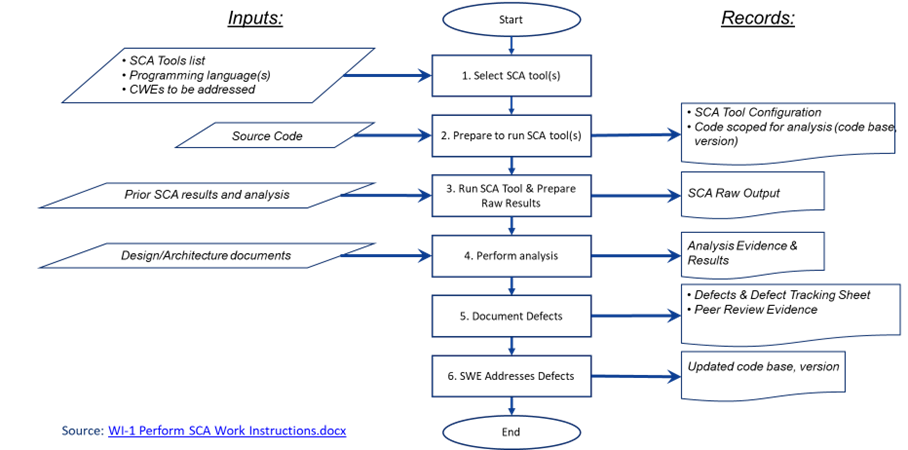
Next, let’s examine the process involved in performing a static code analysis. Here you can see, in the illustration above the steps involved, which we will look at in sequence. The first step, as we already discussed in the last section, is selecting the appropriate SCA tools.
Step two involves preparation for running the tools. During this step, Software Assurance will ensure that the SCA tools and checkers are current and set up according to the tool’s configuration. The input to this step is the source code to be analyzed so that it can be properly scoped.
In step three, the SCA tool is run and then the raw results are prepared for analysis. When running the tool, it’s important to follow the tool-specific procedures on the target source code to extract the resulting warning messages for analysis. After that, the raw data is prepared. You should either eliminate the warnings that have been previously analyzed—that is if prior SCA results are available—or organize the warning messages in a way that prioritizes the checkers important to the project. The output of this step is the raw SCA output, which is prepared in a manner that helps begin the analysis performed in step four. This output could be in the form of extracted data from the SCA tool which is then readied for import into another tool such as an Excel spreadsheet.
During step four you will assess each warning in the code using available project artifacts like the security plan, the design, and the architecture documents. This is done to provide a better understanding of the desired code behavior. Keep in mind that some of the SCA errors and warnings may require a detailed code analysis that can result in the identification of undesirable capabilities, which should be flagged as issues. This may include defects that cause the software to fail to meet the requirements and design specifications, and/or perform unexpectedly under adverse conditions. During the analysis, patterns may emerge showing some checkers reporting false positives more frequently than others. The decision may then be made to deprioritize those specific issues. You may find that a lot of false positives can be eliminated while looking for that nugget of a coding defect, but even so, each one still needs to be analyzed.
Once all the SCA errors and warnings are assessed and analyzed, documentation of the results can be made, which is step five. It’s important to document any verified defects in the project-tracking systems. It’s also best to perform a peer review of the results and findings to ensure correctness before handing them over to software engineering to be addressed, which is what occurs in step six.
This process should then be repeated if software engineering addresses the finding and updates the code base.
For more information on performing an SCA and to see an example, refer to Work Instruction number one on the NASA Engineering Network’s (NEN’s) Software Security 443 community site under the standards and best practices page.
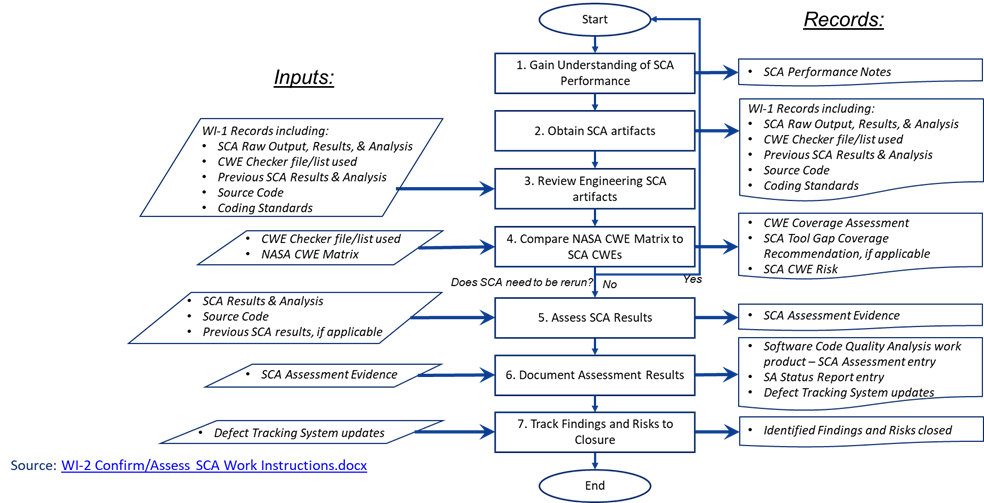
If Software Assurance elects to review the SCA results produced by software engineering rather than perform it themselves, then a different set of activities needs to be performed. Let’s examine that process to confirm or assess the SCA results.
4.2 Software Composition Security Analysis
Another important SCA process is performing Software Composition Security Analysis or S-C-S-A. To keep bad actors from hacking into our systems, the code needs to be checked for vulnerabilities in the open-source software. SCSA is an automatic process that analyzes open-source software in the code base. This analysis is performed to evaluate security, license compliance, and code quality. Therefore, it’s an important SCA process, so let’s examine the steps that are involved in performing it.
The first step is tool selection, which we’ve already explored in the last section, so we will move on to step two. Step two involves the preparation for running the tools. During this step, Software Assurance will ensure that the SCSA tool is properly set up and configured. The source code to be analyzed—both the developed code and third-party code—is the input to this step so that it can be scoped. The output of the tool will be a bill of materials and a list of software components for the code. It will also entail the vulnerabilities of each component, which includes a list of every third-party component that is part of the code and the software license associated with each component.
In step three, you perform the analysis. You’ll want to assess each warning in the code using available project artifacts like the security plan, design, and architecture documents. This is done to provide a better understanding of the desired code behavior. Some of the SCA errors and warnings may require a more detailed code analysis that can result in the identification of undesirable capabilities. These should then be flagged as issues. This may also include defects that cause the software to fail to meet requirements and design specifications, and/or perform unexpectedly under adverse conditions. During the analysis, patterns may emerge showing some checkers reporting false positives more frequently than others. The decision may then be made to deprioritize those specific issues. You may also encounter a lot of false positives while trying to find that coding defect, but each must still be analyzed. Once all SCA errors and warnings are analyzed and assessed, you should document the results.
Step four requires documentation of any verified defects in the project-tracking systems. Peer review of the results and findings should be performed to ensure correctness before it is handed over to software engineering who will move to step five to address those defects.
This process should be repeated if software engineering addresses the findings and updates the code base.
For more information on performing a Software Composition Security Analysis and to see an example, refer to Work Instruction number three on the NASA Engineering Network Software Security community page.
Software Assurance might want to review the SCSA results produced by software engineering instead of performing it themselves. If this is the case, different activities must be performed. Some parts of this process are similar to what we discussed for SCA confirmation and assessment. However, some parts differ as well.
There are a few final points to remember or keep in mind. First, it’s important to remember that false positives are an acknowledged shortcoming of static analysis tools.
Secondly, automated static code analysis might not be able to recognize when proper input validation is being performed. This can result in false positives. It also might not be able to detect the usage of custom API functions or third-party libraries that directly invoke OS commands. This can lead to false negatives, especially if the API or library code is not available for analysis. It generally does not account for environmental considerations when reporting out-of-bounds memory operations. This fact can make it difficult for users to determine which warnings should be investigated first. For example, an analysis tool might report buffer overflows that originate from command line arguments in a program that is not expected to run with setUID [pronounced “set-U-I-D”] or other special privileges.
4.3 Cons of Static Code Analysis
4.3.1 Time-consuming
Static code analysis can become time-consuming, especially when it is required to review and analyze the entire codebase. Most of the review consists of results, which can contain a large amount of data and information that the tool provides. Even though the analysis is automated, it requires someone to go through and interpret the results, determine which issues are real and false positives, and then make the necessary changes to the code.
Additionally, some tools can negatively affect the development process because they run continuously in the background and may slow down the build process or interfere with developer workflows.
4.2.2 False Positives and Negatives
Static code analysis tools may produce False Positives, which can be misleading and require extra time and effort. False positives occur when the code is flagged as potentially problematic or non-compliant, but it is not an actual issue. False Negatives occur when the static code analysis tool fails to identify actual problems in the code.
The following are examples of issues that may arise when using static code analysis tools:
- Unused code or variables flagged as potential bugs
- Incomplete code or code with intentionally missing pieces
- Code that is technically correct but does not meet specific stylistic or formatting standards
- Security vulnerabilities in code that go unnoticed by the tool
- Memory leaks or buffer overflows that the tool fails to detect
- Dead code or redundant code that goes undetected by the tool
4.3.3 Limited Scope
Static code analysis tools can only identify issues that can be detected without executing the code. Some issues, such as performance issues and usability issues, may not be detectable without running the code.
Other areas of limited scope include:
- The inability to detect runtime errors. Static code analysis tools analyze the code without executing it, which means they are unable to detect runtime errors that occur during program execution. This can lead to false positives, where the tool identifies an issue that may not occur during runtime.
- Limited support for complex programming languages. Static code analysis tools are designed to analyze code written in specific programming languages. While they may support popular languages such as Java, C++, and Python, they may not be able to analyze code written in less popular or complex programming languages.
4.4 Conclusion
Static code analysis tools offer a range of benefits for software testing. By identifying potential issues early on in the development process, these tools can help improve the quality and reliability of software. In addition, static code analysis tools can help ensure that code is written in compliance with standards and best practices, improving the codebase’s maintainability over time. Finally, static code analysis tools can help improve software security by identifying potential vulnerabilities and security issues.
5. Resources
5.1 References
- (SWEREF-278) NASA-STD-8739.8B, NASA TECHNICAL STANDARD, Approved 2022-09-08 Superseding "NASA-STD-8739.8A"
- (SWEREF-443) NASA Engineering Network, Software Engineering,
5.2 Tools
5.3 Additional Guidance
Additional guidance related to this requirement may be found in the following materials in this Handbook:
| Related Links |
|---|
5.4 Center Process Asset Libraries
SPAN - Software Processes Across NASA
SPAN contains links to Center managed Process Asset Libraries. Consult these Process Asset Libraries (PALs) for Center-specific guidance including processes, forms, checklists, training, and templates related to Software Development. See SPAN in the Software Engineering Community of NEN. Available to NASA only. https://nen.nasa.gov/web/software/wiki 197
See the following link(s) in SPAN for process assets from contributing Centers (NASA Only).
| SPAN Links |
|---|
5.5 Related Activities
This Topic is related to the following Life Cycle Activities:
