

Page History
...
The macro, in edit mode, shows the tab titles. Add as many titles as you need. These are normally numbered so you can keep track of the chunks of content by the Headers, which should also be numbered (see a typical SWE or Topic page).
1.3
...
Add Div Macros
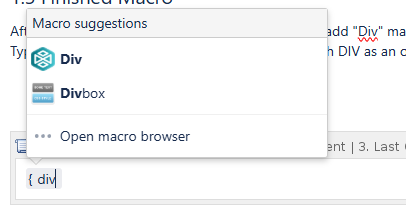 After you put in the titles in place, you will need to add "Div" macros. These are containers for content. Each is added like the tabsetup. Type "{DIV" and you will see a dropdown macro with DIV as an option. Clickon Click on it and the macro will be added to the page.
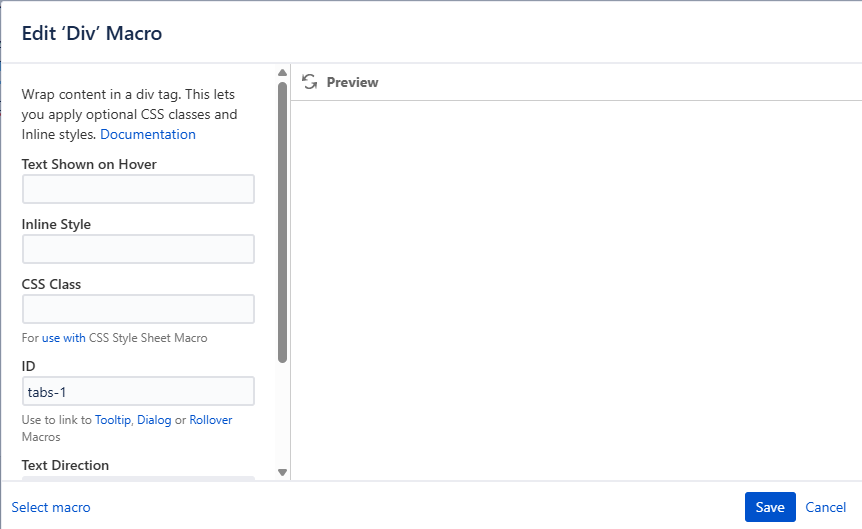
Each DIV will need to be identified with an ID. They are in the format "tabs-#" Numbering is sequential.
Save the Div and add a Div for each tab on your page.
If you are adding a div to an existing page, you will have to number it properly and possibly renumber other tabs and Divs so that the page content sections are all properly numbered and organized.
1.4 Finished Macro
View this page in "Edit" mode to see all the Divs in the tabsetup macro body.
| Tabsetup | |||||||||||||||
|---|---|---|---|---|---|---|---|---|---|---|---|---|---|---|---|
| |||||||||||||||
|
