bannerd

Versions Compared

Key

  • This line was added.
  • This line was removed.
  • Formatting was changed.
Excerpt

Blogs PATs in SWEHB were added in February, 2023. They started out as a way to introduce major changes in SWEHB to the user community. are templates, mostly of checklists, that projects may use and adapt as necessary.  

Tabsetup
01. IntroductionDesign and Development
12. Create Building a Blog PostPAT
23. Blog Area Maintenance
34. Blog History for SWEHBVDLists
Div
idtabs-1

1.

 Introduction to Blogs in SWEHBVD

Initially, blog postings are displayed in the Book A. Introduction page by creating a column on the right for listing the five most recently changed posts that have "swehb" as a label. 

1.1 "Blog Posts" Macro

The "Blog Posts" macro displays the blog posts history. The macro is located in tab 1, in the right column, of the Book A. Introduction page. The macro and the parameters in this page as well as the New in SWEHB page are included below: 

Panel
borderColorblack
titleColorblue
titleWhat's New in SWEHB!

Blog Posts
max5
spacesSWEHBVD
sortmodified
reversetrue
contentexcerpts
labelsswehb

The macro uses the following parameters: 

  • content type to display = excerpts - this gives a small amount of information with the rest of the blog hidden in an Expand macro. 
  • restrict to these labels = swehb - this allows for building new posts for review without immediately posting them. 
  • Restrict to these spaces = SWEHBVD - this keeps the posts local and not from other spaces
  • Maximum blog posts =
    • 5 - limits the number of posts shown in the Introduction page.
    • 100 - displays all posts (up to 100) in the "New in SWEHB" history page.
  • Sort by = Modified , check the Reverse box - this displays the posts based on the modified date and in reverse order, most recent displayed first. 

Design and Development

1.1 Definition of Process Asset Templates

Process Asset Templates are a natural evolution of guidance in SWEs and Topics. They typically start out as checklists, process step lists, document content structures, or other content and evolve into templates that can be used in project activities or as prototypes to be modified, tailored, and improved before being used in a project.

Process Asset Templates is a general category of pages. These pages include: 

  • Checklists - preformatted checklists to be used in some activity. Can be modified to suit a project's unique needs. 
  • Process Lists - lists of things that may be done in some specified order. Can be modified to suit a project's unique needs. 

A PAT is numbered so that existing code in templates and macros for references and tools can be reused. The PAT number series will be included in the first 7 characters of the page title. This code is used in PAT reports, and the PAT Database.  

1.2 Where of PATs Live 

The PATs are developed and stored in the SITE space. This allows them to be used in all versions of the SWEHB. in the hierarchy of SITE they are all under PATs - Process Asset Templates - Database Reports etc. Included in this location are the following pages: 

Children Display
pagePATs - Process Asset Templates - Database Reports etc
excerptTypesimple

  • A template for a “PAT” is stored in SITE. This is used as the Live Template for creating PAT pages. See PAT-000 - PAT Template Page

1.3 Assets in a PAT

Every asset that becomes a Process Asset Template in SWEHB gets it's own page in the SITE space. From this location, the PAT can be: 

  • maintained under the version control afforded by Confluence, 
  • has certain standard formatting, as Word documents, Excel spreadsheets, PowerPoint presentations, etc.
  • made available to all versions of SWEHB by using the Include Page and Excerpt Include macros. 

1.4 PAT Life cycle

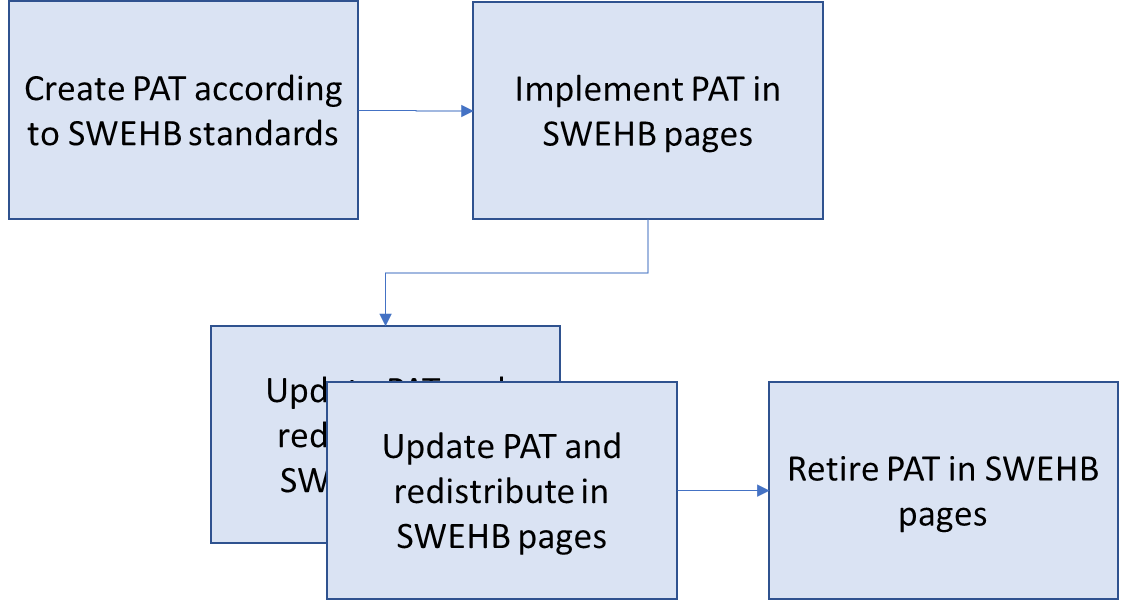
Each Process Asset Template goes through a life cycle where it is created, implemented in a SWEHB page, updated, and finally retired or replaced. 

Image Added

At a high level the life cycle steps are: 

  1. Create a PAT according to SWEHB standards - May be a Word doc, Excel Spreadsheet, or other type of reusable format. 
    1. Must be stored in usable format, not a PDF. 
    2. Details in SWEHBDOC - Configuring an Asset as a PAT
  2. Implement PAT in SWEHB pages - See details in the tab Building a PAT below. 
    1. Create the PAT page in PAT Database.
    2. Manage the PAT page and attachments as described below. 
    3. Add links to the PAT in SWEs and Topics as appropriate including the associated "Related" pages for Activities. 
    4. Add category codes so that PATs appear in reports for those categories. 
    5. Add or update SWE and Topic reports so that PATs appear in reports for those SWEs and Topics. 
  3. Update PATs as necessary: 
    1. Update the PAT page in the Database.
    2. Update the attachments to the PAT Pages.
    3. Confirm that the appropriate attachment is displayed in the PAT page. 
  4. Retire a PAT:
    1. Move it from the PAT Database, and place it under the PAT Retired page.
    2. Open the PATs Page Information and go to each of the locations where is it listed as Incoming links or Outgoing Links and update those pages so they no longer point to the retired PAT.
    3. Add a note into the PAT Database detail stating why the PAT is retired. 
    4. Change the PAT by adding " - RETIRED" to the end of the title.
Div
idtabs-2

2. Building and Deploying a PAT

Building a PAT takes several steps. Each of these steps is described below. 

Expand
titlePreparing the Checklist in PAT Format

Include Page
SWEHBDOC - Configuring an Asset as a PAT

Expand
titleCreate a new PAT

Include Page
SWEHBDOC - Add a New Pat

Expand
titleDeploy a PAT
Include Page
SWEHBDOC - Deploy a PAT on a SWE or Other Page
Expand
titleCategory Reports

Include Page
SWEHBDOC - Category Reports for PATs


Expand
titleSWE or Topic Reports


Expand
titleBlog Posts to Announce a PAT

Whenever there is a PAT added (or significantly updated) it should be announced using a Blog Post. See SWEHBDOC Blogs In SWEHB for details on creating and posting Blog announcements in SWEHB

Div
idtabs-2

2. Creating A Blog Entry

Creating a blog post is simple. On any page in SWEHBVD, hover over the blue circle icon with the plus sign at the top right header area of the page.  You will be given two options, select "Create Content". A sub-menu will open for you to select the type of content to create. Select "Blog Post", then click "Create". 

You will be required to put in a title for the post. Then you can start entering the text of the post. The entire body of the post should be inside of an "Excerpt" macro. Put in a sentence or two to explain the new feature in SWEHBVD that you are telling everyone about. If the announcement is longer than two sentences, you can put the rest of the text into an "Expand" macro within the Excerpt macro. Use the example below: 

2.1 Code using Excerpt and Expand Macros

Image Removed

2.2 Finished Product

Panel
borderColorblack
borderStylesolid
titleExample of the body of a Blog post using Excerpt and Expand macros
Excerpt

The SWEHB has a new look. A Blog will be used to advise you of major changes in SWEHB.

  • INTRODUCTION page has a listing of the latest 5 blog posts.
  • The link "New in SWEHB" will appear above the tabs on main SWEHB pages. it will open a page with the full Blog history. 

More changes will be published as they are implemented. 

Expand
title Click here to see more details ...

"New in SWEHB" is a list of the full blog history, ordered from most recent to oldest. 

To view the full blog history, click on the "New in SWEHB" link on any major page. 

An Expand macro is used in the Excerpt macro to make the full text of the blog entry visible to the user without their having to open the post in another tab or window. 

When you are done, save the post. It will be available for review in the blog area of SWEHBVD. 

When you are ready to publish it to all users of SWEHBVD, add a label to the post. The label should be "swehb". all posts with this label are viewable in the New in SWEHB page as well as on the Book A. Introduction page in SWEHBVD. 

You can check to see that it is available by going to the Introduction page finding it in the Blog list. Note, if you want it to be at the top of the list, you should make sure that it has been recently edited and saved

Div
idtabs-3

3. PAT Maintenance

3.

Blog History Area of SWEHBVD

Image RemovedEach space in Confluence has a blog area where all blogs are stored. Blog pages are not stored in the same area as other pages in the space. 

The Blog Area is where we can see posts that are "under construction" as well as those that are published (using the "swehb" label). 

If you click on the title of any blog post, you will be sent to the Blog Area of SWEHBVD, and the blog entry you clicked on will be displayed. 

From here you can edit and update a post if necessary. You can also delete a post if you must. 

In the example, notice that in the top area, on the left is "Blog" followed by a date code "2022 / October / 25" This represents the date on which this blog entry was first created

If you look at the "page history" you will find all the dates when changes were made. 

On the right side, you will find a listing of months and years. This list can be expanded and contracted using the "+" and "-" icons in front of the date codes. When a month is expanded, it will show all of the blog entries created in that month. If a user gets into this display, they may be quickly confused by the dates on the blog entries. The Full History page ("New in SWEHB" link) is where users should be looking for history, not in this Blog Area

1 Updating PAT Pages 

Expand
titleUpdating a PAT

Include Page
SWEHBDOC - Updating a PAT

Expand
titleAdd or Update a PAT on a SWE or Other Page

Include Page
SWEHBDOC - Deploy a PAT on a SWE or Other Page

Expand
titleManaging Attachments

Include Page
SWEHBDOC - Managing Attachments

Expand
titleBlog Posts to Announce a PAT

Whenever there is a PAT added (or significantly updated) it should be announced using a Blog Post. See SWEHBDOC Blogs In SWEHB for details on creating and posting Blog announcements in SWEHB

Div
idtabs-4

4.

"New In SWEHB" Page

The New in SWEHB page, is where all the SWEHBVD posts are displayed. A link to this page is being added to all of the major pages in SWEHBVD. 

It differs from the Blog Area in that it is limited to only the posts displayed for general use by using the "swehb" label on the post. If a post does not carry the "swehb" label, it is not displayed in the New in SWEHB page or on the SWEHBVD Book A. Introduction page. 

The macro used for this page is the "Blog Post" macro. The macro uses the following parameters: 

  • content type to display = excerpts - this gives a small amount of information with the rest of the blog hidden in an Expand macro
  • restrict to these labels = swehb - this allows for building new posts for review without immediately posting them.
  • Restrict to these spaces = SWEHBVD - this keeps the posts local and not from other spaces
  • Maximum blog posts =100 - displays all posts (up to 100) in the New in SWEHB history page
  • PAT Related Pages

    This is a list of PAT related pages in SITE 

    Children Display
    pagePATs - Process Asset Templates - Database Reports etc
    excerptTypesimple

    Sort by = Modified , check the Reverse box - this displays the posts based on the modified date and in reverse order, most recent displayed first