PATs in SWEHB were added in 2023. They are templates, mostly of checklists, that projects may use and adapt as necessary.  

1.Design and Development

1.1 Definition of Process Asset Templates

Process Asset Templates are a natural evolution of guidance in SWEs and Topics. They typically start out as checklists, process step lists, document content structures, or other content and evolve into templates that can be used in project activities or as prototypes to be modified, tailored, and improved before being used in a project.

Process Asset Templates is a general category of pages. These pages include: 

  • Checklists - preformatted checklists to be used in some activity. Can be modified to suit a project's unique needs. 
  • Process Lists - lists of things that may be done in some specified order. Can be modified to suit a project's unique needs. 

A PAT is numbered so that existing code in templates and macros for references and tools can be reused. The PAT number series will be included in the first 7 characters of the page title. This code is used in PAT reports, and the PAT Database.  

1.2 Where of PATs Live 

The PATs are developed and stored in the SITE space. This allows them to be used in all versions of the SWEHB. in the hierarchy of SITE they are all under PATs - Process Asset Templates - Database Reports etc. Included in this location are the following pages: 

  • A template for a “PAT” is stored in SITE. This is used as the Live Template for creating PAT pages. See PAT-000 - PAT Template Page

1.3 Assets in a PAT

Every asset that becomes a Process Asset Template in SWEHB gets it's own page in the SITE space. From this location, the PAT can be: 

  • maintained under the version control afforded by Confluence, 
  • has certain standard formatting, as Word documents, Excel spreadsheets, PowerPoint presentations, etc.
  • made available to all versions of SWEHB by using the Include Page and Excerpt Include macros. 

1.4 PAT Life cycle

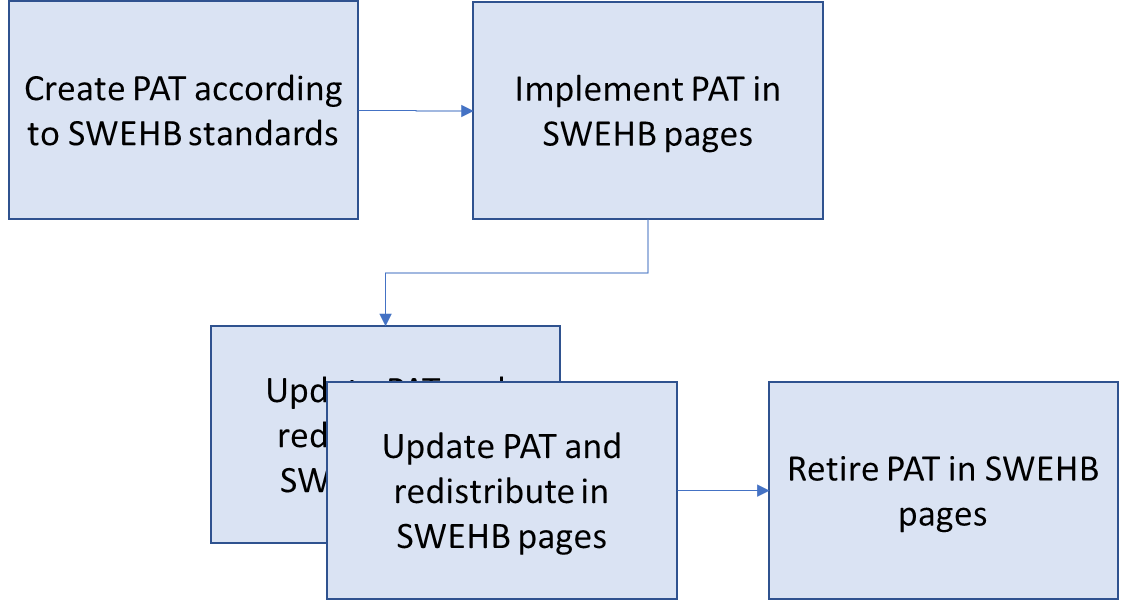
Each Process Asset Template goes through a life cycle where it is created, implemented in a SWEHB page, updated, and finally retired or replaced. 

At a high level the life cycle steps are: 

  1. Create a PAT according to SWEHB standards - May be a Word doc, Excel Spreadsheet, or other type of reusable format. 
    1. Must be stored in usable format, not a PDF. 
    2. Details in SWEHBDOC - Configuring an Asset as a PAT
  2. Implement PAT in SWEHB pages - See details in the tab Building a PAT below. 
    1. Create the PAT page in PAT Database.
    2. Manage the PAT page and attachments as described below. 
    3. Add links to the PAT in SWEs and Topics as appropriate including the associated "Related" pages for Activities. 
    4. Add category codes so that PATs appear in reports for those categories. 
    5. Add or update SWE and Topic reports so that PATs appear in reports for those SWEs and Topics. 
  3. Update PATs as necessary: 
    1. Update the PAT page in the Database.
    2. Update the attachments to the PAT Pages.
    3. Confirm that the appropriate attachment is displayed in the PAT page. 
  4. Retire a PAT:
    1. Move it from the PAT Database, and place it under the PAT Retired page.
    2. Open the PATs Page Information and go to each of the locations where is it listed as Incoming links or Outgoing Links and update those pages so they no longer point to the retired PAT.
    3. Add a note into the PAT Database detail stating why the PAT is retired. 
    4. Change the PAT by adding " - RETIRED" to the end of the title.

2. Building and Deploying a PAT

Building a PAT takes several steps. Each of these steps is described below. 


Whenever there is a PAT added (or significantly updated) it should be announced using a Blog Post. See SWEHBDOC Blogs In SWEHB for details on creating and posting Blog announcements in SWEHB. 

3. PAT Maintenance

3.1 Updating PAT Pages 

Whenever there is a PAT added (or significantly updated) it should be announced using a Blog Post. See SWEHBDOC Blogs In SWEHB for details on creating and posting Blog announcements in SWEHB. 

4. PAT Related Pages

This is a list of PAT related pages in SITE