

Building The New 8.24 Topic
To start with, Topic 8.24 will remain in place. We will be
- building child pages under 8.24 to contain the "What is the Risk?" content
- copying the "What is the Risk?" content for each risk into its new child page
- Removing the "Expand: What is the Risk? after the child page is verified
- Adding a link to each Risk, in the risk definition Expand, pointing to the child page for the "What is the Risk?".
1. Building the Child Page
The first of the child pages is already built. It is R001 - Incomplete Code Peer Reviews. It contains all the structure you need. By copying it to a new page, you will be able to keep it in the proper location in SITE space. The simplest way to do this is: 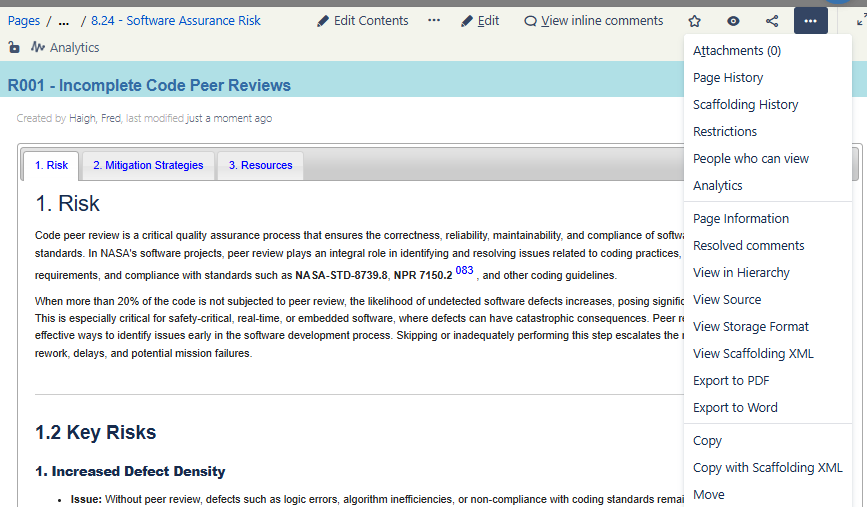
- View the R001 - Incomplete Code Peer Reviews page.
- in the dropdown menu, toward the bottom, select "Copy".
- This will take you to a "Copy page" window where you will specify the location for the new page.
- Space should be "Site Resources"
- Parent page should be "8.24 - Software Assurance Risk"
- Don't check either of the boxes
- Click on Copy
- You will be in an exact copy of the page and the title of the page will be "Copy of R001 - ..."
- Replace the title with the new title for the page. Use the risk number and headline from 8.24. for example, "R002 - Incomplete implementation of static code analysis results"
- With just the title changed, Save the page and verify that it is looking proper.
- The title will be for the new page
- The content will still be from the old page. This will be fixed next.
2. Put Content Into New Page
The structure for the new page is now in place. You can now fix the page up with the proper content.
- Edit the new page and notice that there is a "Set Data" box at the top. This contains the tab number for the Resources tab. Don't change this unless you want to add more tabs and in doing so you move the Resources tab.
- In the DIV for tab 1, Copy and paste the content from the "What is the Risk?" Expand in 8.24 for this risk. This will contain introductory comments, Key Risks, and Root causes.
- In the DIV for tab 2, copy and paste the balance of the content from the "What is the Risk?" Expand in 8.24 for the risk. This will ensure that you have everything in the new page that you want.
- If you want to put in any references you can do that at this time (see below).
- Save the new page and verify that everything is in its place.
3. Cleanup Topic 8.24 For Risk Page Added
This step will cleanup and test Topic 8.24 to verify that it is complete.
- Edit topic 8.24 and go to the risk you just built the new page for
- Add "Click here for "What is the risk?": R001 - Incomplete Code Peer Reviews" to the bottom of the Expand for the definition of the risk. Make sure that the link is pointing to the proper new page for the risk.
- Delete the Expand that is titled "What is the Risk?" It has been replaced by the link to the new page.
- Save the page and test everything:
- Topic 8.24 should have the risk you just worked on
- The Risk should contain all the cells in the table with the correct colors
- The content of cell 1 should include
- the Risk title
- The Expand for the risk definition
- The Expand for the risk definition should contain the link to the new page for the What is the Risk?
4. Adding References
The References macros for Topic pages works on a 4 character code in the page title such as "8.24". Since the Risks are numbered with a 4 character code we can use this for handling Risks. We use the same macro, "refstable-topic" to gather and display the references for the risk.
If you need to add a reference to your new Risk page, here are the steps for putting a reference that is already in the References Table into the References list.
- Find the SWEREF in the References Table. Open it in a new tab.
- Click on "Edit Content" to open the SWEREF for editing the variable values.
- In the field for "SWE or Topic" , put your cursor at the end of the field. Using SWEREF-083 as an example, you will see entries for "Topic R001" and "Topic R002" at the end of the field. you can add more risks to the end of the list as you want.
- When you are done, be sure that you DON'T hit the return key and put a new line in the field. Ending a field in a SWEREF with a new line will mess up the macros that build the Reference lists.
- Save the SWEREF.
- Go to the new risk page you just added into the SWEREF and refresh it to see the reference in the Resources tab. Working examples of this are R001 - Incomplete Code Peer Reviews and R002 - Incomplete Implementation Of Static Code Analysis Results.
