3.2.3.4 Diagrams and Images needs a link to the page on formatting attached images. |
|
When certain documents are used in the SWEHB, it is convenient to have a copy of the document in the Document Archive. When it is brought into the Archive it is decomposed into pieces that can be used in many places in the SWEHB. Usually, pieces are used in many pages throughout the a SWEHB version. It is easier to maintain document integrity by pulling in a piece with an Include-Page macro than to manually copy and paste it from the parent document.
The process of copying a document into the Archive and disassembling it is described below.
3.1 Selecting a Document to Archive
Only those documents that are static and have many pieces that will be quoted in the SWEHB in many places should be Archived.
- Static means the document is in it's final, released form. It would not be very productive to archive many draft documents and then have to update all the places where the pieces are used throughout a SWEHB Version.
- "many pieces" means there are lots of small items in a document that will be quoted in SWEHB pages. For example, NPR 7150.2 has several paragraphs that are used in other pages of the SWEHB. NASA-STD-8729.8B has many requirements and SA Tasks that are included in pages throughout the SWEHBVD version.
The documents that are currently in the Document Archive include:

3.2 Disassembly and Reassembly of a Document
To replicate a document accurately, it will take some editing time. The process below should be done to a level that will yield usable document components. Breaking down a document too much will just be a waste of time if the pieces are never used elsewhere.
In this example, the NPR 7150.2D is used.
3.2.1 Top Level Document Container
The top level document container is a child page of Document Archive.
- It may be constructed by opening the Archive page and selecting the "Create Content" icon. This will force the new page to be created in the proper location in the pagetree.
- Use the document ID as a page title - in this case, "NPR 7150.2D" was used
- Add an Excerpt at the top of the page and put in it the full ID of the document, Approved date, Title, and a comment regarding where the text comes from and how it is assembled. See the example below:
- From the source document, copy the full text and paste it into the new container.
- Save your work
- Check to see that:
- the document is located under the Document Archive
- the document is properly named (page title)
- the excerpt for the new document appears on the Document Archive page
- the document contains the copy of content from the original document
3.2.2 Document Cleanup
This is the most time consuming part of adding a document to the archive. The document must be reformatted in Confluence to look like what it did in the source (usually NODIS, PDF or other server format).
In the example below, the cleanup of NPR 7150.2D is discussed.
- At the top of the document page there is a 2 column table with the document name and other data about the document.
- The Subject line is formatted in header 1 style
- Responsible Office is formatted in header 2 style
- Table of Contents is formatted in header 3 style
- Preface and its subheadings are all in paragraph style
- Chapter 1 is formatted in header 4 style
Moving down to the Preface styles like Header 1, 2, and 3 are used as appropriate to replicate the styles used in the original document. Where Notes are used in the original document, the Note macro is used to contain the note. Where there are diagrams and images, these may have been converted to attachments by Confluence. These will be reformatted later.
Continue reformatting to the end of the document.
Save and test the document to see that everything has been reformatted and looks close to the original source document. Fix formatting issues as much as you can at this point.
3.2.3 Create Child Pages For Reusable Selections
It will be necessary to go through the document and identify the pieces that will be used in other pages of the SWEHB. For each of those reusable pieces, they will need to be copied into child pages under the document page in the pagetree. They also need to be named so they are easy to find. Finally, the text in the document is replaced with an "Include Page" macro.
3.2.3.1 Text Selection
The next section in the example that is considered a reusable portion of text is the paragraph "P.2 Applicability b". It is a piece of text that is referred to be other SWEHB pages. It needs to be pulled out into a child page and included in the document.
- a child page under NPR 7150.2D was created and named 2D-P.2 APPLICABILITY b
- The title of the child page is "2D-P.2 APPLICABILITY b" with
- the prefix "2D" indicating the NPR 7150.2D origin,
- the name "P.2 APPLICABILITY b" indicating the source in the document where the content is taken
- the content is the paragraph formatted so that when it is displayed in the NPR 7150.2D document it will look properly formatted (not like it was cut and pasted in).
- replace the text in the document with an Include-Page macro pointing to the child page so that the document is complete.
3.2.3.2 Table Selection
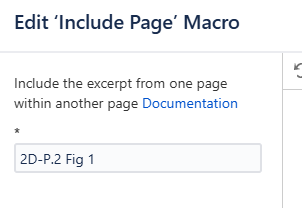
This example shows how a small tabular piece of information is converted into a child page.
- a child page under NPR 7150.2D was created and named 2D-P.2 Fig 1
- The title of the child page is "2D-P.2 Fig 1" with
- the prefix "2D" indicating the NPR 7150.2D origin,
- the name "P.2 Fig 1" indicating the source in the document where the content is taken
- the content is a table format listing software classifications it was built from a Panel macro with text added and formatted to look like the original document.
- replace the text in the document with an Include-Page macro pointing to the child page so that the document is complete.
3.2.3.3 Larger Table Selection
This example shows how a large table of information is converted into a child page.
- a child page under NPR 7150.2D was created and named 2D Requirements Mapping Matrix
- The title of the child page is "2D Requirements Mapping Matrix" with
- the prefix "2D" indicating the NPR 7150.2D origin,
- the name "Requirements Mapping Matrix" indicating the source in the document where the content is taken
- the content is a table format listing sections of the document, corresponding SWE numbers, Requirement Text, Technical Authority, ..."
- replace the text in the document with an Include-Page macro pointing to the child page so that the document is complete.
The content replicates the table found in the original document. It uses header styles to display headers appropriately.
3.2.3.4 Diagrams and Images
When a diagram or image is pasted from a source document, Confluence will automatically build an attachment and upload it to the document. If this diagram or image needs to be used as a child page, it will need to be added as an attachment to the child page, pulled into the child page, and then formatted in the child page before it can be used properly.
3.2.4 Test Reassembled Document
Once all of the child pages are built and the text is replaced with the appropriate Include Page,
- The whole document must be compared to the original document to ensure that no parts are missing.
- Check to see that child pages appear in the proper locations.
- Check to see that child pages are properly formatted to look like the originals.
The same Include Page macros that brought child pages into the document will also be used to put those child pages into other SWEHB pages as necessary.
3.3 Using A Piece Of A Document In A SWEHB Page
When you need to display a piece of a archived document in a SWEHB page, Use an "Include-Page" macro.
For example, the NASA software Classification structure is a list of Classes of software taken from paragraph 2, Figure 1 of the NPR 7150.2D document. That table is in the 2D-P.2 Fig 1 child page under NPR 7150.2D in the Document Archive. It is shown in the note box below.
The include page macro that was used to fill the note panel above is shown in the note panel below: